
Chevrolet Cruze Repair Manual: Body Side Trim Panel Replacement - Left Side
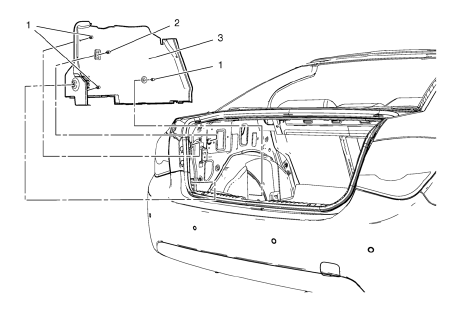
Preliminary Procedure
- Remove the rear side door sill trim plate. Refer to Rear Side Door Sill Trim Plate Replacement.
- Remove the rear seat back. Refer to Rear Seat Replacement.
- Remove the quarter window garnish molding. Refer to Quarter Window Garnish Molding Replacement.
- Rear Window Panel Trim Retainer Clip
- Body Side Trim Panel Retainer (Qty: 3)
- Body Side Trim Panel Assembly
Body Side Trim Panel Replacement - Right Side
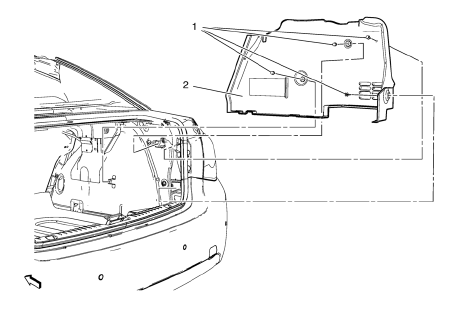
- Body Side Trim Panel Retainer (Qty: 4)
- Body Side Trim Panel Assembly
Radio Front Side Door Speaker Grille Bezel Replacement
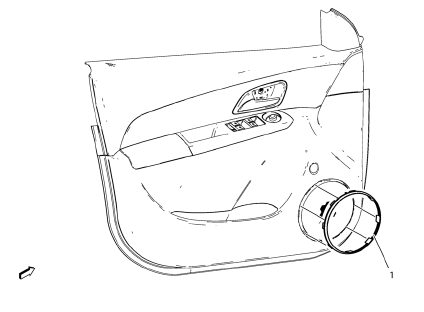
- Radio Front Side Door Speaker Grille Bezel Assembly
Radio Rear Side Door Speaker Grille Bezel Replacement
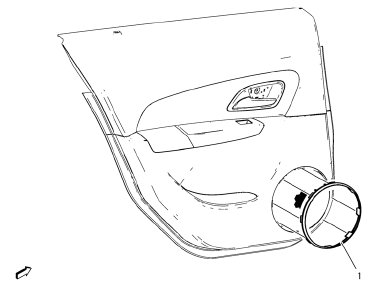
- Radio Rear Side Door Speaker Grille Bezel Assembly
Rear Window Panel Trim Replacement
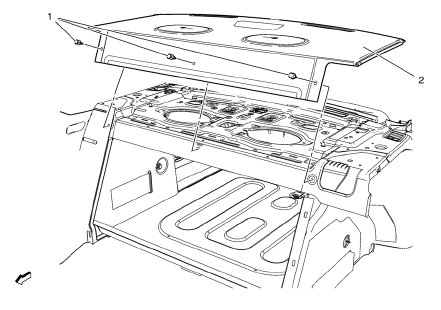
Preliminary Procedure
- Remove the rear seat back.
- Remove the high mount stop lamp. Refer to High Mount Stop Lamp Replacement.
- Rear Window Panel Trim Clip (Qty: 6)
- Rear Window Panel Trim Assembly
 Center Pillar Upper Garnish Molding Replacement
Preliminary Procedure
Remove the center pillar lower garnish molding. Refer to Center Pillar
Lower Ga rnish Molding Replacement
Remove the seat belt from the front seat. Refer ...
 Rear Side Door Trim Replacement
Rear Side Door Inside Handle Bolt Finish Cap
Procedure
Pull handle back to remove cap. Use suitable tool to unsnap.
Rear Side Door Inside Handle Screw
Caution: Refer to Fastener Caut ...
Other materials:
Different Size Tires and Wheels
If wheels or tires are installed that are a different size than the original
equipment wheels and tires, vehicle performance, including its braking, ride and
handling characteristics, stability, and resistance to rollover may be affected.
If the vehicle has electronic systems such as antilock ...
Using the System
The infotainment system is controlled by touching the screen, and by using the
knobs and other buttons.
Voice recognition, through the steering wheel controls, can be used to control
the infotainment features.
Press on the steering wheel controls
to begin voice recognition.
See Voice Recog ...
Removal Procedure
Warning: Refer to Approved Equipment for Collision Repair Warning in the
Preface section.
Warning: Refer to Collision Sectioning Warning in the Preface section.
Warning: Refer to Glass and Sheet Metal Handling Warning in the Preface section.
Disable the SIR System. Refer to SIR
...
