
Chevrolet Cruze Repair Manual: Driver or Passenger Seat Replacement
Removal Procedure
Warning: Refer to SIR Warning in the Preface section.
Warning: When carrying a live inflator module, make sure the bag opening is pointed away from you. This minimizes the chance of injury in the case of an accidental deployment. Never carry the inflator module by the wires. Never carry the inflator module by the connector on the underside of the module.
Make sure that the bag and trim cover are facing up whenever you place a live inflator module on any surface. This is necessary to provide a free space for the bag to expand in the unlikely event of accidental deployment. Never rest the steering column assembly on the steering wheel with the inflator module face down, and the column vertical. This may result in personal injury.
- Disable the supplemental inflatable restraint (SIR) system. Refer to SIR Disabling and Enabling.
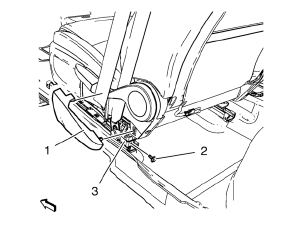
- Remove the front seat outer recliner upper finish cover (1).
- Unscrew the bolt (2)
- Remove the seat belt (3) from the front seat.
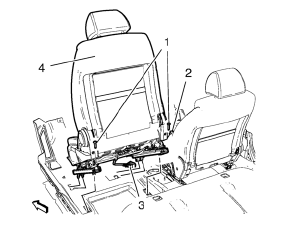
- Unscrew the 2 bolts (1).
- Disconnect the wiring harness plug (2) from the belt buckle.
- Release and disconnect the wiring harness plug (3) front seat.
- Remove the front seat (4) from the guide in front.
Installation Procedure
- Perform the front seat track synchronization. Refer to Front Seat Track Synchronization.
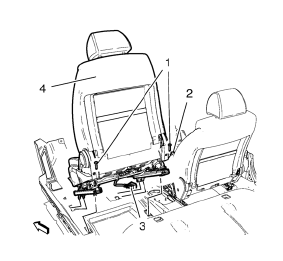
- Install the front seat (4) to the guide in front.
- Connect and latch the wiring harness plug (3) front seat.
- Connect the wiring harness plug (2) from the belt buckle.
Caution: Refer to Fastener Caution in the Preface section.
- Tighten the 2 bolts (1).
Tighten 45 N·m (33 lb in)
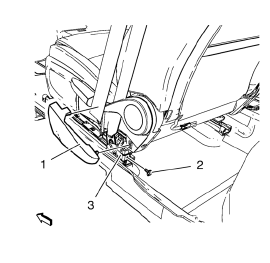
- Install the seat belt (3) to the front seat.
- Tighten the bolt (2).
Tighten 9 N·m (80 lb in)
- Install the front seat outer recliner upper finish cover (1).
- Enable the SIR system. Refer to SIR Disabling and Enabling.
Front Seat Outer Recliner Upper Finish Cover Replacement
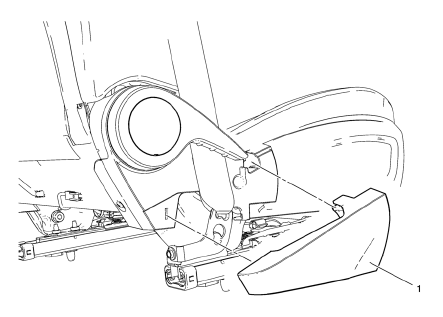
- Front Seat Outer Recliner Upper Finish Cover Assembly
Front Seat Adjuster Replacement
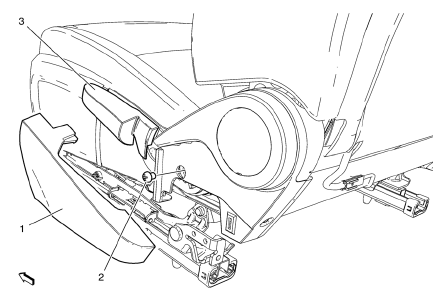
- Front Seat Outer Recliner Upper Finish Cover
- Front Seat Adjuster Bolt
Caution: Refer to Fastener Caution in the Preface section.
Tighten 20 N·m(15 lb in)
- Front Seat Adjuster
 Seat Hardware, Trim, and Upholstery
Specifications
...
 Front Seat Track Synchronization
The fore/aft manual adjuster is composed of an inboard track assembly (5),
and outboard track (4) assembly, and an adjuster handle (1).
Each track assembly is made of an upper track (2) and a ...
Other materials:
Shock Absorber Disposal
Warning: Gas charged shock absorbers contain high pressure gas. Do
not remove the snap ring from inside the top of the tube. If the snap
ring is removed, the contents of the shock absorber will come out with extreme
force which may result in personal injury.
Warning: To prevent personal inju ...
Front Fender Replacement
Preliminary Procedure
Remove the front bumper fascia. Refer to Front Bumper Fascia
Replacement
Remove front bumper fascia guide. Refer to Front Bumper Fascia
Replacement
Remove the wheelhouse liner. Refer to Front Wheelhouse Liner Replacement
Remove the headlamp. Refer to H ...
Air/Wind Noise
Special Tools
CH-39570 Chassis Ear
GE-41416 Ultrasonic Leak Detector
Warning: Refer to Assistant Driving Warning in the Preface section.
To analyze a reported windnoise condition, test drive the vehicle to
determine the origin of the noise.
Choose a regular route with smooth and strai ...
