
Chevrolet Cruze Owners Manual: Filling the Tank
WARNING
Fuel vapors and fuel fires burn violently and can cause injury or death.
• To help avoid injuries to you and others, read and follow all the instructions on the fuel pump island.
• Turn off the engine when refueling.
• Keep sparks, flames, and smoking materials away from fuel.
• Do not leave the fuel pump unattended.
• Do not reenter the vehicle while pumping fuel.
• Keep children away from the fuel pump and never let children pump fuel.
• Fuel can spray out if the fuel cap is opened too quickly.
This spray can happen if the tank is nearly full, and is more likely in hot weather.
Open the fuel cap slowly and wait for any hiss noise to stop then unscrew the cap all the way
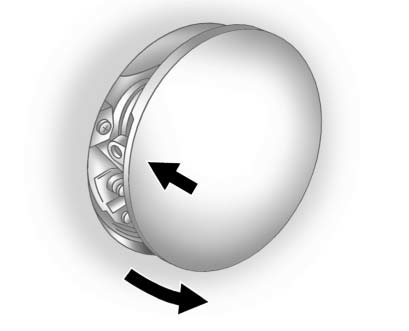
The tethered fuel cap is behind the fuel door on the vehicle's passenger side. To open the fuel door, push the rearward center edge in and release. When applied pressure is removed, the fuel door will spring partially open.
Turn the fuel cap counterclockwise to remove. Reinstall the cap by turning it clockwise until it clicks.
If the cap is not properly installed, the malfunction indicator lamp will come on.
Do not top off or overfill the tank.
Wait a few seconds before removing the nozzle. Clean fuel from painted surfaces as soon as possible.
WARNING
If a fire starts while you are refueling, do not remove the nozzle. Shut off the flow of fuel by shutting off the pump or by notifying the station attendant.
Leave the area immediately.
Notice: If a new fuel cap is needed, be sure to get the right type of cap from your dealer. The wrong type of fuel cap might not fit properly, might cause the malfunction indicator lamp to light, and could damage the fuel tank and emissions system.
 Fuel Additives
To provide cleaner air, all gasolines in the United States are now required to
contain additives that help prevent engine and fuel system deposits from forming,
allowing the emission control syste ...
 Filling a Portable Fuel Container
WARNING
Filling a portable fuel container while it is in the vehicle can cause fuel
vapors that can ignite either by static electricity or other means. You or others
could be badly burned and the ...
Other materials:
Symbols
The vehicle has components and labels that use symbols instead of text. Symbols
are shown along with the text describing the operation or information relating to
a specific component, control, message, gauge, or indicator.
: This symbol is shown when you need
to see your owner manual for addi ...
Accident With or Without Air Bag Deployment - Component Inspections
Warning: Proper operation of the Supplemental Inflatable Restraint
(SIR) sensing system requires that any repairs to the vehicle
structure return the vehicle structure to the original production configuration.
Not properly repairing the vehicle structure could cause
non-deployment of the air b ...
Installation Procedure
Cut the front compartment front rail in corresponding locations to fit
the remaining original panel. The sectioning joint should be
trimmed to allow a gap of one-and-one-half-times the metal thickness at the
sectioning joint.
Create a 50 mm (2 in) backing plate from the unused porti ...
