
Chevrolet Cruze Repair Manual: Front Side Door Check Replacement
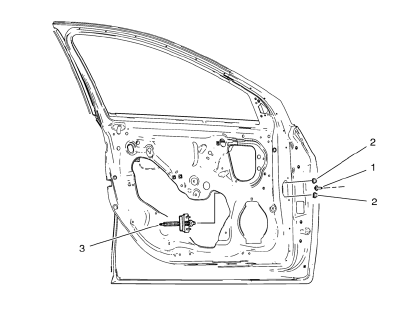
Prliminary Procedure
- Remove front side door trim panel. Refer to Front Side Door Trim Replacement
- Remove the front side door water deflector. Refer to Front Side Door Water Deflector Replacement
- Front Side Door Check Link Bolt
Caution: Refer to Fastener Caution in the Preface section.
Tip
Place the door in the full open position.
Tighten
25 N·m (18 lb ft)
- Front Side Door Check Link Nut
Procedure
Remove the water deflector.
Tighten 9 N·m (79 lb in)
- Front Side Door Check
Fuel Tank Filler Door Replacement
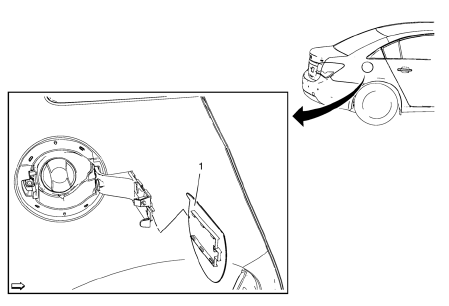
- Fuel Tank Filler Door
Procedure
Open the fuel tank filler door
 Rear Compartment Lid Replacement
Preliminary Procedure
Remove the rear compartment lid inner panel trim. Refer to Rear Compartment
Lid Inner Panel Trim Replacement.
Rear Compartment Lid Hinge Bolt (Qty: 4)
Caution: Refer ...
 Fuel Tank Filler Pipe Housing Replacement
Preliminary Procedure
Remove rear wheelhouse panel liner. Refer to Rear Wheelhouse Panel Liner
Replacement.
Remove fuel tank filler door. Refer to Fuel Tank Filler Door
Replacement.
...
Other materials:
Rear Compartment Lid Emblem/Nameplate Replacement (VCDi AT)
Rear Compartment Lid Emblem Assembly
Caution: Refer to Exterior Trim Emblem Removal Caution in the
Preface section.
Procedure
The part and surface should be 21°C (70°F) prior to installation. The
vehicle should remain 21°C (70°F) for
one hour after assembly to allow adhesive to deve ...
Additional links
Instrument Cluster Replacement
Preliminary Procedure
Remove instrument panel lower cluster trim plate. Refer to Instrument
Panel Cluster Lower Trim Plate Replacement.
Remove instrument panel steering column upper trim cover. Refer to
Steering Column Upper Trim Cover Replacement.
...
Tire Pressure Monitor System
The Tire Pressure Monitor System (TPMS) uses radio and sensor technology to check
tire pressure levels. The TPMS sensors monitor the air pressure in your tires and
transmit tire pressure readings to a receiver located in the vehicle.
Each tire, including the spare (if provided), should be check ...
