
Chevrolet Cruze Repair Manual: Front Side Door Replacement
Preliminary Procedure
Remove the front side door trim panel. Refer to Front Side Door Trim Replacement.
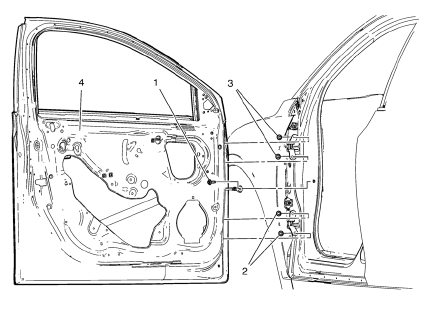
- Front Side Door Check Link Bolt
Caution: Refer to Fastener Caution in the Preface section.
Procedure
- Remove the water deflector.
- Disconnect the door electrical connector.
- Support the door before removing the hinge bolts.
- With the aid of an assistant, remove the door.
Tighten 25 N·m (18 lb ft)
- Front Side Door Lower Hinge Bolt (Qty: 2)
Tighten 25 N·m (18 lb ft)
- Front Side Door Upper Hinge Bolt (Qty: 2)
Tighten 25 N·m (18 lb ft)
- Front Side Door
Procedure
- Transfer all of the internal components.
- Adjust the front side door as needed. Refer to Front Side Door Adjustment.
 Front Side Door Adjustment
Preliminary Procedure
Remove the front wheelhouse liner. Refer to Front Wheelhouse Liner
Replacement.
Front Side Door
Caution: Refer to Fastener Caution in the Preface section.
Procedure
...
 Rear Side Door Adjustment
Rear Side Door
Caution: Refer to Fastener Caution in the Preface section.
Procedure
Loosen the rear door hinge bolt (Qty: 4) to adjust the rear door.
Adjust the rear door in order to ...
Other materials:
Front Fog Lamp Bezel Replacement
Preliminary Procedure
Remove front bumper fascia. Refer to Front B 1. umper Fascia
Replacement.
Remove front fog lamp. Refer to Front Fog Lamp Replacement.
Front Fog Lamp Bezel Screw
Caution: Refer to Fastener Caution in the Preface section.
Tighten
2.5 N·m (23 lb in)
Fro ...
Accessories and Modifications
Adding non‐dealer accessories or making modifications to the vehicle can affect
vehicle performance and safety, including such things as airbags, braking, stability,
ride and handling, emissions systems, aerodynamics, durability, and electronic systems
like antilock brakes, traction cont ...
High Strength Low Alloy Steel
This information provides repair recommendations and general guidelines for
steel classified as High Strength Low Alloy Steel, also known
as HSLA. This type of steel normally has a tensile strength range from 300-700
MPa.
General Motors recommends the following when repairing or replacing th ...
