
Chevrolet Cruze Repair Manual: Front Side Door Weatherstrip Replacement - Body Side
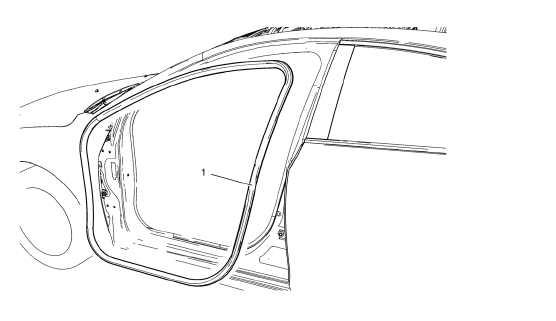
Front Side Door Weatherstrip - Body Side
Procedure
- Start at the rear upper corner of the door opening and pull the weatherstrip away from the door opening flange.
- Position the weatherstrip in the upper corner of the center pillar.
- Working downward along the front edge, install the weatherstrip on the door opening flange ensuring that the carrier is fully seated in the corners.
- Using a rubber mallet, ensure that the weatherstrip is seated on the entire door opening flange.
 Front Side Door Weatherstrip Replacement - Door Side
Front Side Door Check Bolt
Caution: Refer to Fastener Caution in the Preface section.
Tighten
25 N·m (19 lb ft)
Front Side Door Weatherstrip - Door Side
Procedure
Unclip weath ...
 Rear Compartment Lid Weatherstrip Replacement
Rear Compartment Lid Weatherstrip
Procedure
Start at the upper corner of the rear compartment opening and pull the
weatherstrip away from the rear
compartment opening flange.
Position ...
Other materials:
Scheduling Service Appointments
When the vehicle requires warranty service, contact your dealer and request an
appointment. By scheduling a service appointment and advising the service consultant
of your transportation needs, your dealer can help minimize your inconvenience.
If the vehicle cannot be scheduled into the service ...
Vehicle Messages
Messages displayed on the DIC indicate the status of the vehicle or some action
that may be needed to correct a condition. Multiple messages may display one after
the other.
The messages that do not require immediate action can be acknowledged and cleared
by pressing SET/CLR. The messages tha ...
Symbols
The vehicle has components and labels that use symbols instead of text. Symbols
are shown along with the text describing the operation or information relating to
a specific component, control, message, gauge, or indicator.
: This symbol is shown when you need
to see your owner manual for addi ...
