
Chevrolet Cruze Repair Manual: Front Side Door Window Weatherstrip Replacement
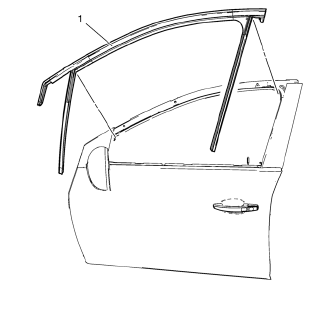
Preliminary Procedure
- Remove the outside rearview mirror. Refer to Outside Rearview Mirror Replacement.
- Remove the front side door window frame rear cover. Refer to Front Side Door Window Frame Rear Cover Replacement.
Front Side Door Window Weatherstrip
Procedure
Pull the front side door window weatherstrip away from the outer window flange to remove.
Rear Side Door Window Weatherstrip Replacement
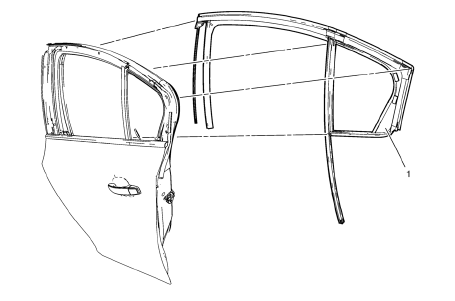
Preliminary Procedure
- Remove the rear side door stationary window. Refer to Rear Side Door Stationary Window Replacement
- Remove the rear side door window frame front cover. Refer to Rear Side Door Window Frame Front Cover Replacement.
Rear Side Door Window Weatherstrip
Procedure
Pull the rear side door window weatherstrip away from the outer window flange to remove.
Adhesive Service Kit Description
Use the urethane adhesive for replacement of any urethane adhesive-installed windows.
Use these materials based on specific manufacturer.
Do NOT intermix primers or adhesives from one manufacturer to another.
Always follow the system manufacturer's instructions for application, handling, and curing.
 Rear Side Door Window Outer Sealing Strip Replacement
Rear Side Door Window Outer Sealing Strip Assembly
...
 Power Windows Description and Operation
Power Windows System Components
The power window system consists of the following components:
Driver window switch
Passenger window switch
Left rear window switch
Right rear window switch
...
Other materials:
Steering Linkage Inner Tie Rod Replacement (Hydraulic Power Steering)
Special Tools
CH-6247 Removal and Installation Tool for the Steering Linkage Inner Tie Rod
For equivalent regional tools, refer to Special Tools.
Removal Procedure
Raise and support the vehicle. Refer to Lifting and Jacking the
Vehicle.
Remove the tire and wheel assembly. Refer to ...
Rear Bumper Fascia Guide Replacement
Preliminary Procedure
Remove the rear bumper fascia. Refer to Rear Bumper Fascia Replacement.
Rear Bumper Fascia Guide Rivet (Qty: 4)
Special Tools
BO-594-A Hand Rivet Tongs
For equivalent regional tools, refer to Special Tools.
Rear Bumper Fascia Guide
Rear Bumper Fascia Inner ...
Installation Procedure
Cut the front hinge pillar body in corresponding locations to fit the
remaining original panel. The sectioning joint should be trimmed
to allow a gap of one-and-one-half-times the metal thickness at the
sectioning joint.
Create a 50 mm (2 in) backing plate from the unused portion of ...
