
Chevrolet Cruze Owners Manual: Heated Seats
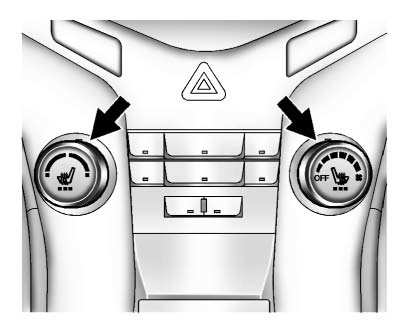
If available, the controls are on the center stack. The engine must be running to operate the heated seats.
Press  or
or
 to heat the driver or passenger seat
cushion and seatback.
to heat the driver or passenger seat
cushion and seatback.
Press the control once for the highest setting. With each press of the control, the heated seat will change to the next lower setting, and then the off setting. Three lights indicate the highest setting and one light the lowest.
 Seat Adjustment
Manual Front Seats
To adjust a manual seat:
1. Pull the handle at the front of the seat.
2. Slide the seat to the desired position and release the handle.
3. Try to move the seat back and forth ...
 Head Restraint Adjustment
Do not drive until the head restraints for all occupants are installed and adjusted
properly.
To achieve a comfortable seating position, change the seatback recline angle
as little as necessary w ...
Other materials:
Power Steering Pump Belt Replacement
Special Tools
CH 49800 Installer Power Steering Pump Belt
For equivalent regional tools, refer to Special Tools.
Removal Procedure
Caution: Do not use belt dressing on the drive belt. Belt dressing
causes the breakdown of the composition of the drive belt. Failure
to follow this recommendatio ...
Tire Pressure Monitor
This vehicle may have a Tire Pressure Monitor System (TPMS).
The low tire pressure warning light alerts to a significant loss in pressure
of one of the vehicle's tires. If the warning light comes on, stop as soon as possible
and inflate the tires to the recommended pressure shown on the T ...
Removal Procedure
Warning: Refer to Approved Equipment for Collision Repair Warning in the
Preface section.
Warning: Refer to Glass and Sheet Metal Handling Warning in the Preface section.
Disable the SIR System. Refer to SIR Disabling
and Enabling.
Disconnect the negative battery cable. Refer to ...
