
Chevrolet Cruze Repair Manual: How To Indentify Plastic Parts
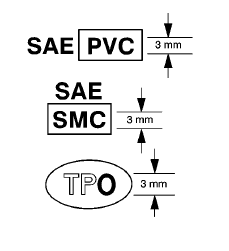
Plastic parts can be identified by the SAE code, which is usually found on the rear of the part, and/or by the characteristics of the plastic.
Knowing the type of plastic aids in selecting the proper repair materials and in selecting the proper repair procedure.
Look for the SAE code stamped into the part.
Code Found
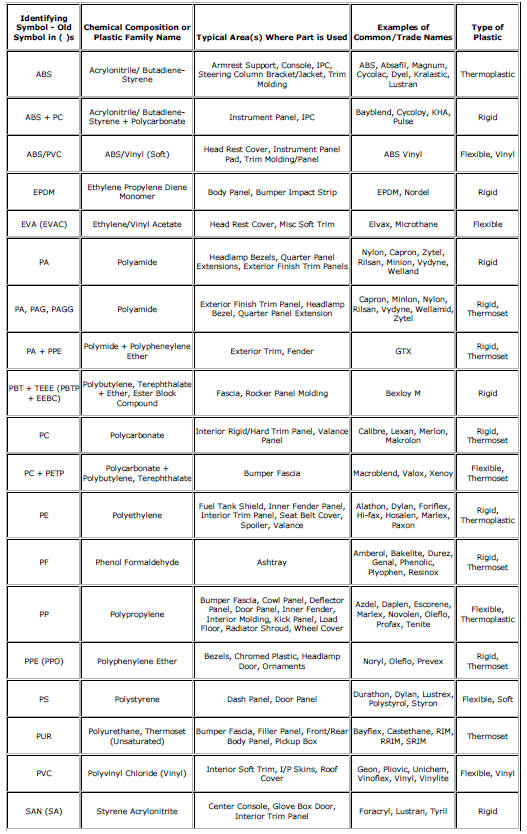
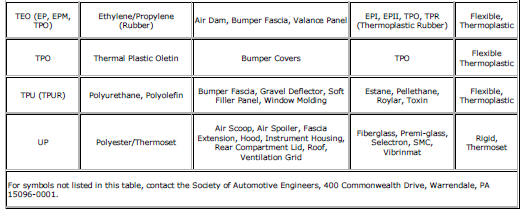
Match the code to those in the plastic identification chart to determine whether the plastic is thermoplastic or thermoset plastic, and whether the plastic is rigid or flexible. Refer to Plastic Identification and Refinishing Systems
No Code Found
Warning: Do NOT use a plastic burn test to distinguish the type of plastic. The burn test produces vapors which are harmful.
Perform one or both of the following tests to determine if the part is thermoplastic polyolefin or thermoset non-polyolefin.
Float Test
- Cut a shaving of plastic from the back of the part.
The shaving should be free of mold release agents and paint.
- Place the shaving in a container of water.
- Thermoplastic polyolefin floats.
- Thermoset non-polyolefin sinks.
Abrasion Test
- Sand a spot near the damaged area with Grade 36 Roloc Disc.
- Thermoplastic polyolefin material melts or frays when sanded.
- Thermoset non-polyolefin material sands cleanly.
Thermoplastic and thermoset plastics can be either rigid or flexible. Thermoplastic plastic parts are best repaired with a hot iron plastic material-feed welder, but are usually replaced. Thermoset plastic can be repaired with epoxy or other more rigid 2 package repair material.
For general repair instructions, refer to General Plastic Repair.
Plastic Identification and Refinishing Systems
 General Plastic Repair
Warning: In order to reduce the risk of personal injury when exposed
to toxic fumes while grinding, cutting, or applying repair material on
any type of sheet molded compound or RIM rigid plastic, o ...
 Body systems
...
Other materials:
Rear Compartment Lid Replacement
Preliminary Procedure
Remove the rear compartment lid inner panel trim. Refer to Rear Compartment
Lid Inner Panel Trim Replacement.
Rear Compartment Lid Hinge Bolt (Qty: 4)
Caution: Refer to Fastener Caution in the Preface section.
Tighten
9 N·m (80 lb ft)
Rear Compartment Lid
...
Front Floor Panel Carpet Replacement
Preliminary Procedures
Remove front seats. Refer to Driver or Passenger Seat
Replacement.
Remove rear seat. Refer to Rear Seat Replacement.
Remove the front floor console. Refer to Front Floor Console
Replacement.
Remove front sill panels. Refer to Front Side Door Sil ...
Rear Axle Bushing Replacement
Special Tools
CH 6616 Hydraulic Hand Pump
CH 6615-10 Hydraulic Cylinder
CH-48377-1 Chisel
CH-49233 Adapter
CH 906-42 Adapter
For equivalent regional tools. Refer to Special Tools
Removal Procedure
Warning: Use of eye goggles is necessary to prevent personal injury.
Remove the re ...
