
Chevrolet Cruze Owners Manual: Power Door Locks
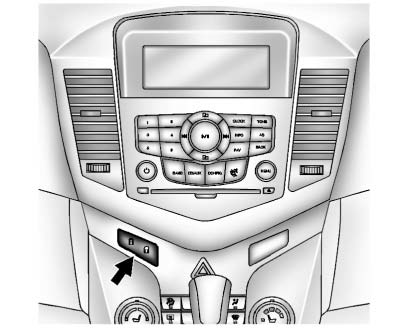
 (Lock)
: Press to lock the doors.
 (Unlock):
Press to unlock the doors.
 Door Locks
WARNING
Unlocked doors can be dangerous.
• Passengers, especially children, can easily open the doors and fall out of
a moving vehicle. The chance of being thrown out of the vehicle in a crash is ...
 Automatic Door Locks
Automatic Door Lock
The doors are programmed to automatically lock when the shift lever is moved
out of P (Park).
The automatic door lock feature cannot be disabled.
Automatic Door Unlock
The do ...
Other materials:
Windshield Washer Nozzle Hose Replacement
Preliminary Procedure
Remove the hood insulator. Refer to
Hood Insulator Replacement.
Place a clean container under the front driver side near where the
windshield washer nozzle and windshield washer pump
hose will be disconnected.
Recover all lost windshield washer solven ...
Passenger Airbag Status Indicator
The vehicle has a passenger sensing system.
The instrument panel has a passenger airbag status indicator.
United States
Canada
When the vehicle is started, the passenger airbag status indicator will light
ON and OFF, or the symbol for on and off, for several seconds as a system check.
If ...
Roof
Specifications
Sunroof Schematics
Sunroof Component Views
Sunroof Frame
Sunroof Sunshade
Sunroof Window
Sunroof Window Seal
Sunroof Housing Rear Drain Hose
Sunroof Housing Drain Gutter
Sunroof Frame Bolts
Sunroof Window Guide
Sunroof Air Deflector Cover
Su ...
