
Chevrolet Cruze Repair Manual: Removal Procedure
Warning: Refer to Approved Equipment for Collision Repair Warning in the Preface section.
Warning: Refer to Glass and Sheet Metal Handling Warning in the Preface section.
- Disable the SIR System. Refer to SIR Disabling and Enabling.
- Disconnect the negative battery cable. Refer to Battery Negative Cable Disconnection and Connection.
- Remove all related panels and components.
- Visually inspect the damage. Repair as much of the damage as possible.
- Remove the sealers and anti-corrosion materials from the repair area, as necessary. Refer to Anti-Corrosion Treatment and Repair.
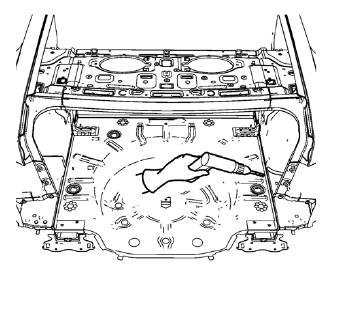
- Locate and mark all the necessary factory welds of the rear compartment floor panel.
- Note the number and location of weld studs for installation of the service assembly.
- Drill all factory welds. Note the number and location of welds for installation of the service assembly.
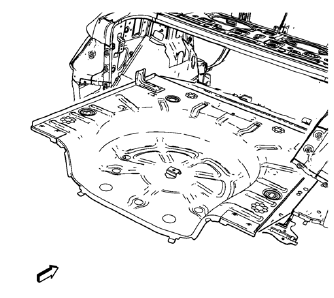
- Remove the damaged rear compartment floor panel.
 Rear Compartment Floor Panel Sectioning (MAG-Welding)
Note: According to different corrosion warranties, only the
regional mandatory joining methods are allowed. ...
 Installation Procedure
Align the rear compartment floor panel.
Drill 8 mm (5/16 in) for plug welding along the edges of the rear compartment
floor panel as noted from the original panel.
Clean and prepare th ...
Other materials:
Transmission
Driver Shift Control (DSC) allows the automatic transmission to be shifted similar
to a manual transmission.
Electronic Range Select (ERS) allows for the selection of a range of gears.
Up-Shift Light
If the vehicle has a manual transmission, it will have an up-shift light that
indicates whe ...
Installation Procedure
Cut the rear side rail in corresponding locations to fit the remaining
original panel. The sectioning joint should be trimmed to allow a
gap of one-and-one-half-times the metal thickness at the sectioning joint.
Create a 50 mm (2 in) backing plate from the unused portion of the
serv ...
Floor Mats
WARNING
If a floor mat is the wrong size or is not properly installed, it can interfere
with the pedals.
Interference with the pedals can cause unintended acceleration and/or increased
stopping distance which can cause a crash and injury. Make sure the floor mat does
not interfere with the p ...
