
Chevrolet Cruze Owners Manual: Power Windows
WARNING
Children could be seriously injured or killed if caught in the path of a closing window. Never leave keys in a vehicle with children. When there are children in the rear seat, use the window lockout button to prevent operation of the windows.
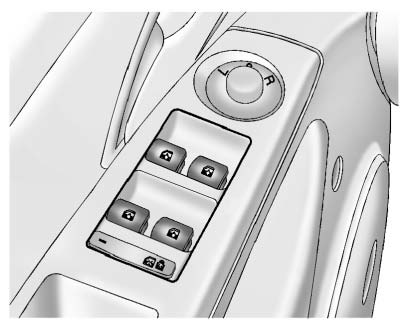
Press the switch down to open the window. Pull the front of the switch up to close it.
The switches work when the ignition is in ON/RUN, ACC/ACCESSORY, or in Retained Accessory Power (RAP).
Express Window Operation
This vehicle may have windows with an express-up or down feature. This feature allows the window to be lowered or raised without holding the switch. Passenger side and rear windows only have express-down.
Pull a window switch up or push it down all the way, release it, and the window goes down or up automatically. Stop the window by pushing or pulling the switch.
Obstacle Detection Feature
If equipped with express-up, and an object is in the path of the window when closing, the window will stop at the obstruction and auto-reverse to a preset factory position. Weather conditions such as severe cold and/ or ice may also cause the window to auto-reverse. The window will return to normal operation once the obstruction or condition is removed.
If conditions prevent the window from closing and the window continues to auto-reverse, it is possible to close the window with the ignition in ON/RUN by holding the window switch in the partially or fully pulled up position. Release of the switch from the partially pulled up position will cause the window to stop. Release of the switch from the fully pulled up position will activate the express-up and related obstacle detection features.
Programming the Power Windows
If the battery on the vehicle has been recharged or disconnected, or is not working, the windows will need to be reprogrammed for the express-up feature to work. Before reprogramming, replace or recharge the vehicle's battery.
To program each front window: 1. With the ignition in ACC/ ACCESSORY or ON/RUN, or when RAP is active, close all doors.
2. Press and hold the power window switch until the window is fully open.
3. Pull the power window switch up until the window is fully closed.
4. Continue holding the switch up for approximately two seconds after the window is completely closed.
The window is now reprogrammed.
Repeat the process for the other windows.
Window Lockout
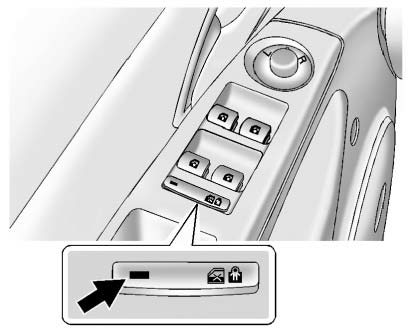
This feature prevents the rear passenger windows from operating, except from the driver position.
Press  to activate the rear window
lockout. The indicator light comes on when activated.
to activate the rear window
lockout. The indicator light comes on when activated.
The rear door locks are also disabled. Press
 again to deactivate the lockout and
enable the rear door locks.
again to deactivate the lockout and
enable the rear door locks.
If the indicator light flashes, the feature may not be working properly.
Overload Feature
If the windows are operated repeatedly in short intervals, the window operation is disabled for a short time.
 Windows
WARNING
Never leave a child, a helpless adult, or a pet alone in a vehicle, especially
with the windows closed in warm or hot weather.
They can be overcome by the extreme heat and suffer permanent ...
 Sun Visors
Pull the sun visor down to block glare. Detach the sun visor from the center
mount to pivot to the side window, or to extend along the rod, if available. ...
Other materials:
Battery Disconnect Warning
Warning: Unless directed otherwise, the ignition and start switch
must be in the OFF or LOCK position, and all electrical loads must be
OFF before servicing any electrical component. Disconnect the negative battery
cable to prevent an electrical spark should a tool or
equipment come in contact ...
Voice Recognition
Voice recognition allows for hands-free operation of the infotainment system
features.
Voice recognition can be used when the radio is on or when Retained Accessory
Power (RAP) is active.
See “Retained Accessory Power (RAP)” in the owner manual. The system maintains
a minimum volume level.
...
Removal Procedure
Warning: Refer to Approved Equipment for Collision Repair Warning in the
Preface section.
Warning: Refer to Glass and Sheet Metal Handling Warning in the Preface section.
Disable the SIR System. Refer to SIR Disabling
and Enabling.
Disconnect the negative battery cable. Refer to ...
