
Chevrolet Cruze Repair Manual: Rear Compartment Lid Emblem/Nameplate Replacement (CDX)
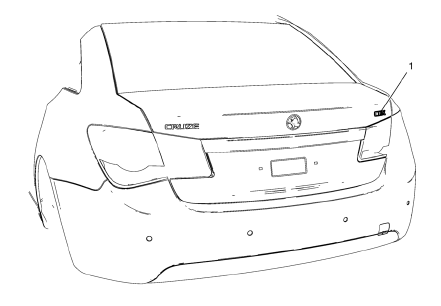
Rear Compartment Lid Emblem Assembly
Caution: Refer to Exterior Trim Emblem Removal Caution in the Preface section.
Procedure
- The part and surface should be 21°C (70°F) prior to installation. The vehicle should remain 21°C (70°F) for one hour after assembly to allow adhesive to develop sufficient bond strength.
- Use a Heat Gun or equivalent to remove the old nameplate. Clean all adhesive from the rear compartment panel and wipe the surface dry with a clean lint-free towel prior to installing the new nameplate.
- When removing protective liners from the adhesive tape, be careful not to touch tape with hands and do not allow tape to come in contact with dirt or any foreign matter prior to adhesion.
- Close the rear compartment lid prior to adhesion.
- Using the palm of the hand, wet out the emblem to the rear compartment lid to ensure full adhesion of the emblem is made.
 Rear Compartment Lid Emblem/Nameplate Replacement (Cruze - Right Side)
Rear Compartment Lid Emblem Assembly
Caution: Refer to Exterior Trim Emblem Removal Caution in the Preface
section.
Procedure
The part and surface should be 21°C (70°F) prior to installati ...
 Rear Compartment Lid Emblem/Nameplate Replacement (Cruze - Left Side)
Rear Compartment Lid Emblem Assembly
Caution: Refer to Exterior Trim Emblem Removal Caution in the Preface
section.
Procedure
The part and surface should be 21°C (70°F) prior to installati ...
Other materials:
Tyre and Wheel Removal and Installation
Removal Procedure
Raise and suitably support the vehicle. Refer to Lifting and Jacking the
Vehicle.
Remove the wheel center cap.
Mark the relationship of the wheel (2) to the hub.
Remove the wheel nuts (1).
Warning: If penetrating oil gets on the vertical surfaces between the ...
StabiliTrak® Syste
The StabiliTrak system assists with directional control of the vehicle in difficult
driving conditions. The system is on when the vehicle is started.
• To turn off both Traction Control and StabiliTrak, press and hold
until
and
illuminate in the instrument cluster.
• Press again to turn o ...
Installation Procedure
Note: If the location of the original plug weld holes can
not be determined, space the plug weld holes every 40 mm (1½ in).
Drill 8 mm (5/16 in) for plug welding along the edges of the underbody
rear side rail reinforcement as noted from
the original panel.
Clean and ...
