
Chevrolet Cruze Repair Manual: Rear Compartment Lid Emblem/Nameplate Replacement (Rear Emblem)
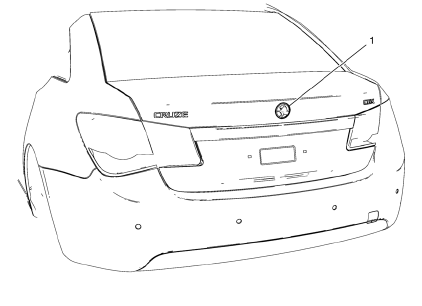
Rear Compartment Lid Emblem Assembly
Caution: Refer to Exterior Trim Emblem Removal Caution in the Preface section.
Procedure
- The part and surface should be 21°C (70°F) prior to installation. The vehicle should remain 21°C (70°F) for one hour after assembly to allow adhesive to develop sufficient bond strength.
- Use a Heat Gun or equivalent to remove the old nameplate. Clean all adhesive from the rear compartment panel and wipe the surface dry with a clean lint-free towel prior to installing the new nameplate
- When removing protective liners from the adhesive tape, be careful not to touch tape with hands and do not allow tape to come in contact with dirt or any foreign matter prior to adhesion.
- Close the rear compartment lid prior to adhesion.
- Using the palm of the hand, wet out the emblem to the rear compartment lid to ensure full adhesion of the emblem is made.
 Rear Compartment Lid Emblem/Nameplate Replacement (Cruze - Left Side)
Rear Compartment Lid Emblem Assembly
Caution: Refer to Exterior Trim Emblem Removal Caution in the Preface
section.
Procedure
The part and surface should be 21°C (70°F) prior to installati ...
 Rear Compartment Lid Emblem/Nameplate Replacement (LT or LTZ)
Rear Compartment Lid Emblem Assembly
Caution: Refer to Exterior Trim Emblem Removal Caution in the
Preface section.
Procedure
The part and surface should be 21°C (70°F) prior to installati ...
Other materials:
Installation Procedure
Drill 8 mm (5/16 in) for plug welding along the edges of the service
panel as noted from the original panel.
Clean and prepare the attaching surfaces for welding.
Position the roof rear header (1) panel on the vehicle.
Verify the fit of the panel.
Clamp the roof rear header ...
Tire Pressure Light
For vehicles with the Tire Pressure Monitor System (TPMS), this light comes on
briefly when the engine is started. It provides information about tire pressures
and the TPMS.
When the Light Is On Steady
This indicates that one or more of the tires are significantly underinflated.
A Driver In ...
Loss of Control
Skidding
There are three types of skids that correspond to the vehicle's three control
systems:
• Braking Skid — wheels are not rolling.
• Steering or Cornering Skid — too much speed or steering in a curve causes tires
to slip and lose cornering force.
• Acceleration Skid — too much thro ...
