
Chevrolet Cruze Repair Manual: Headlining Trim Panel Replacement (Without Sunroof)
Warning: Do not attempt to repair or alter the head impact energy-absorbing material glued to the headliner or to the garnish trims. If the material is damaged, replace the headliner and/or the garnish trim. Failure to do so could result in personal injury.
Caution: If a vehicle is equipped with a head curtain inflator module ensure that the inflator module and tether are undamaged. If tether or curtain airbag are damaged in any way, they must be replaced.
Caution: Use care when working around the head curtain inflator module. Sharp tools may puncture the curtain airbag. If the head curtain inflator module is damaged in any way, it must be replaced.
Preliminary Procedure
- Disable the SIR system. Refer to SIR Disabling and Enabling
- Remove the sunshade supports. Refer to Sunshade Support Replacement
- Remove the roof console. Refer to Roof Console Replacement
- Remove the windshield outside moisture sensor cover. Refer to Windshield Outside Moisture Sensor Cover Replacement
- Remove the assist handles. Refer to Assist Handle Replacement
- Remove the windshield garnish moldings. Refer to Windshield Garnish Molding Replacement
- Remove the center pillar upper garnish moldings. Refer to Center Pillar Upper Garnish Molding Replacement
- Remove the quarter window garnish moldings. Refer to Quarter Window Garnish Molding Replacement
- Move the front seat fully forward and recline.
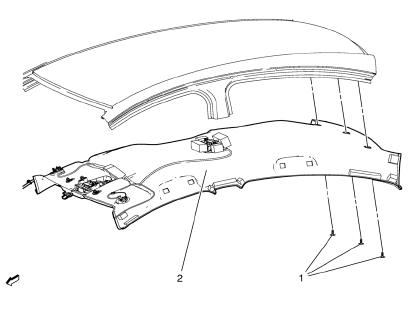
- Headliner Trim Panel Retainer (Qty: 3)
- Headliner Trim Panel Assembly
Procedure
Disconnect the electrical connectors.
 Headlining Trim Panel Replacement (With Sunroof)
Warning: Do not attempt to repair or alter the head impact
energy-absorbing material glued to the headliner or to the garnish
trims. If the material is damaged, replace the headliner and/or the ...
 Instrument Panel and Console Trim
Specifications
Instrument Panel Insulator Seal Replacement
Preliminary Procedure
Remove the instrument panel assembly. Refer to Instrument Panel Assembly
Replacement.
Instrument P ...
Other materials:
Problems with Route Guidance
Inappropriate route guidance can occur under one or more of the following conditions:
• The turn was not made on the road indicated.
• Route guidance might not be available when using automatic rerouting for the next
right or left turn.
• The route might not be changed when using automati ...
Environmental Fallout (Acid Rain)
Caution: Refer to Clearcoat/Ultraviolet Screeners Caution in the
Preface section.
Note: Always refer to the manufacturer's packaged instructions for
the detailed procedures of materials used for compounding and/or
polishing.
Since the severity of the condition varies from area to area, proper ...
Steering Angle Sensor Calibration Warning
Warning: For vehicles with electric power steering (EPS) and without
a vehicle stability enhancement program, the steering angle sensor
MUST always be calibrated after the battery has been disconnected. Failure to
calibrate the steering angle sensor could limit the operation
of the EPS system ...
