
Chevrolet Cruze Repair Manual: Removal Procedure
Warning: Refer to Approved Equipment for Collision Repair Warning in the Preface section.
Warning: Refer to Glass and Sheet Metal Handling Warning in the Preface section.
- Disable the SIR System. Refer to SIR Disabling and Enabling.
- Disconnect the negative battery cable. Refer to Battery Negative Cable Disconnection and Connection.
- Remove all related panels and components.
- Visually inspect the damage. Repair as much of the damage as possible.
- Remove the sealers and anti-corrosion materials from the repair area, as necessary. Refer to Anti-Corrosion Treatment and Repair.
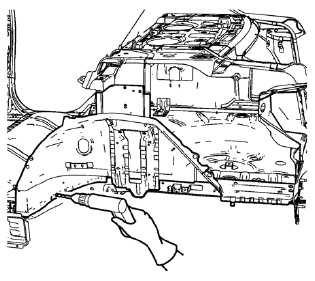
- Locate and mark all the necessary factory welds of the rear inner wheelhouse.
Note: Note the number and location of welds for installation of the service assembly.
- Drill all factory welds.
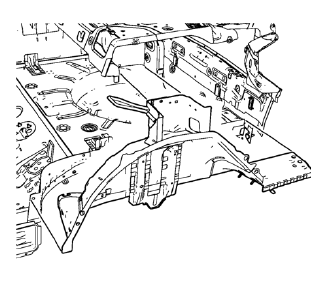
- Remove the rear inner wheelhouse.
 Rear Wheelhouse Panel Replacement (MIG-Brazing)
Note: According to different corrosion warranties, only the
regional mandatory joining methods are allowed. ...
 Installation Procedure
Create 6 x 20 mm (4/16 x 12/16 in) slots for MIG-brazing along the edges
of the rear inner wheelhouse as noted from the original
panel.
Note: If the location of the original plug weld ...
Other materials:
Rear Axle Bushing Replacement
Special Tools
CH 6616 Hydraulic Hand Pump
CH 6615-10 Hydraulic Cylinder
CH-48377-1 Chisel
CH-49233 Adapter
CH 906-42 Adapter
For equivalent regional tools. Refer to Special Tools
Removal Procedure
Warning: Use of eye goggles is necessary to prevent personal injury.
Remove the re ...
Navigation Symbols
Following are the most common symbols that appear on a map screen.
The vehicle symbol indicates the current position and heading direction of the
vehicle on the map.
The destination symbol marks the final destination after a route has been planned.
The waypoint symbol marks one or more se ...
Installation Procedure
Cut the rocker outer panel in corresponding locations to fit the
remaining original panel. The sectioning joint should be trimmed to
allow a gap of one-and-one-half-times the metal thickness at the sectioning
joint.
Create 50 mm (2 in) backing plates from the unused portion of the
...
