
Chevrolet Cruze Repair Manual: Headlining Trim Panel Replacement (With Sunroof)
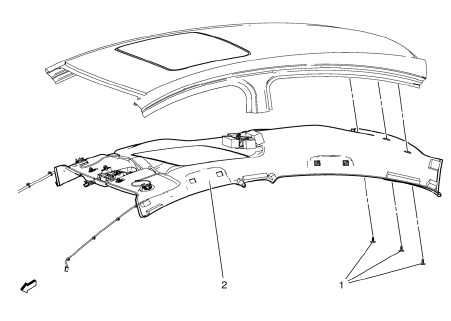
Warning: Do not attempt to repair or alter the head impact energy-absorbing material glued to the headliner or to the garnish trims. If the material is damaged, replace the headliner and/or the garnish trim. Failure to do so could result in personal injury.
Caution: If a vehicle is equipped with a head curtain inflator module ensure that the inflator module and tether are undamaged. If tether or curtain airbag are damaged in any way, they must be replaced.
Caution: Use care when working around the head curtain inflator module. Sharp tools may puncture the curtain airbag. If the head curtain inflator module is damaged in any way, it must be replaced.
Preliminary Procedures
- Disable the SIR system. Refer to SIR Disabling and Enabling
- Remove the sunshade supports. Refer to Sunshade Support Replacement
- Remove the roof console. Refer to Roof Console Replacement
- Remove the windshield outside moisture sensor cover. Refer to Windshield Outside Moisture Sensor Cover Replacement
- Remove the assist handles. Refer to Assist Handle Replacement
- Remove the windshield garnish moldings. Refer to Windshield Garnish Molding Replacement
- Remove the center pillar upper garnish moldings. Refer to Center Pillar Upper Garnish Molding Replacement
- Remove the quarter window garnish moldings. Refer to Quarter Window Garnish Molding Replacement
- Move the front seat fully forward and recline.
- Headliner Trim Panel Retainer (Qty: 3)
- Headliner Trim Panel Assembly
Procedure
Disconnect the electrical connectors.
 Front Floor Panel Carpet Replacement
Preliminary Procedures
Remove front seats. Refer to Driver or Passenger Seat
Replacement.
Remove rear seat. Refer to Rear Seat Replacement.
Remove the front floor console. R ...
 Headlining Trim Panel Replacement (Without Sunroof)
Warning: Do not attempt to repair or alter the head impact
energy-absorbing material glued to the headliner or to the garnish
trims. If the material is damaged, replace the headliner and/or the ...
Other materials:
Head Restraints
The vehicle's front and rear seats have adjustable head restraints in the outboard
seating positions.
WARNING
With head restraints that are not installed and adjusted properly, there is
a greater chance that occupants will suffer a neck/ spinal injury in a crash. Do
not drive until the h ...
Floor Carpet Drying
If the carpet or the pad or insulator is wet, use the following criteria for
drying or for replacing the components:
For a 1-piece carpet assembly bonded to a cotton or a fiber padding,
replace the entire assembly
For a 2-piece carpet assembly with a cotton or a fiber padding, replace
...
Rear Side Door Trim Replacement
Rear Side Door Inside Handle Bolt Finish Cap
Procedure
Pull handle back to remove cap. Use suitable tool to unsnap.
Rear Side Door Inside Handle Screw
Caution: Refer to Fastener Caution in the Preface section.
Tighten
2.5 N·m (23 lb in)
Rear Side Door Pull Handle Screw
T ...
