
Chevrolet Cruze Repair Manual: Front Floor Panel Carpet Replacement
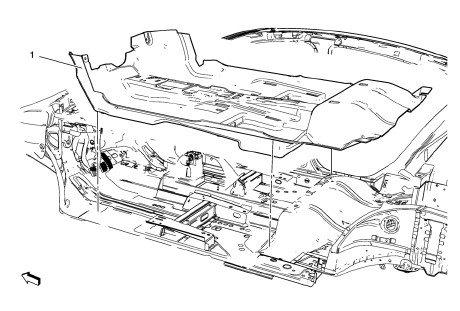
Preliminary Procedures
- Remove front seats. Refer to Driver or Passenger Seat Replacement.
- Remove rear seat. Refer to Rear Seat Replacement.
- Remove the front floor console. Refer to Front Floor Console Replacement.
- Remove front sill panels. Refer to Front Side Door Sill Trim Plate Replacement.
- Remove rear sill panels. Refer to Rear Side Door Sill Trim Plate Replacement.
- Remove center pillar lower garnish moldings. Refer to Center Pillar Lower Garnish Molding Replacement.
Front Floor Panel Carpet Assembly
Procedure
Loosen Transmission Control.
 Floor Carpet Drying
If the carpet or the pad or insulator is wet, use the following criteria for
drying or for replacing the components:
For a 1-piece carpet assembly bonded to a cotton or a fiber padding,
repla ...
 Headlining Trim Panel Replacement (With Sunroof)
Warning: Do not attempt to repair or alter the head impact
energy-absorbing material glued to the headliner or to the garnish
trims. If the material is damaged, replace the headliner and/or the ...
Other materials:
Mild Steel
This information provides repair recommendations and general guidelines for
steel classified as Mild Steel. This type of steel normally has a
tensile strength less than 270 MPa. This includes the common steel names of:
Mild Steel
Bake Hardenable Steel (BH)
Solid Solution Strengthened Stee ...
General Information
Your vehicle is an important investment. This section describes the required
maintenance for the vehicle. Follow this schedule to help protect against major
repair expenses resulting from neglect or inadequate maintenance. It may also help
to maintain the value of the vehicle if it is sold. It ...
Storing the Tire Sealant and Compressor Kit
The tire sealant and compressor kit is located in the trunk, under the load floor,
behind an access panel.
To remove the kit:
1. Open the trunk.
2. Turn the left knob counterclockwise and the right knob clockwise, 90 degrees,
at the same time. Then pull the access panel rearward and up to r ...
