
Chevrolet Cruze Owners Manual: Remote Keyless Entry (RKE) System
The Remote Keyless Entry (RKE) transmitter may work up to 60m (195 ft) away from the vehicle.
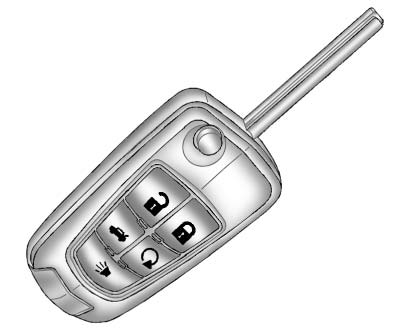
RKE Transmitter with Remote Start Shown
Press the key release button to extend the key blade. The key can be used for the ignition and all locks.
Press  to unlock the driver door
or all doors.
to unlock the driver door
or all doors.
Press  to lock all doors.
Lock and unlock feedback can be personalized.
Press and hold  briefly to open the
trunk.
briefly to open the
trunk.
Press and hold  briefly to initiate
vehicle locator.
briefly to initiate
vehicle locator.
Press and hold for at least three
seconds to sound the panic alarm.
for at least three
seconds to sound the panic alarm.
Press again to cancel the panic alarm.
 Initial Drive Information
This section provides a brief overview about some of the important features that
may or may not be on your specific vehicle.
For more detailed information, refer to each of the features which can b ...
 Remote Vehicle Start
For vehicles with this feature, the engine can be started from outside the vehicle.
Starting the Vehicle
1. Aim the RKE transmitter at the vehicle.
2. Press and release .
3. Immediately after comp ...
Other materials:
Removal Procedure
Warning: Refer to Approved Equipment for Collision Repair Warning in the
Preface section.
Warning: Refer to Collision Sectioning Warning in the Preface section.
Warning: Refer to Glass and Sheet Metal Handling Warning in the Preface section.
Disable the SIR System. Refer to SIR Dis ...
Installation Procedure
Clean and prepare the attaching surfaces for welding.
Position the roof rear header panel (1) on the vehicle.
Verify the fit of the panel.
Clamp the roof rear header panel into position.
Spot weld accordingly as noted from the original panel.
Apply the sealer ...
Head Restraints
The vehicle's front and rear seats have adjustable head restraints in the outboard
seating positions.
WARNING
With head restraints that are not installed and adjusted properly, there is
a greater chance that occupants will suffer a neck/ spinal injury in a crash. Do
not drive until the h ...
