
Chevrolet Cruze Owners Manual: Shifting out of Park
This vehicle is equipped with an automatic transmission shift lock control system. The shift lock is designed to: • Prevent ignition key removal unless the shift lever is in P (Park) with the shift lever button fully released.
• Prevent movement of the shift lever out of P (Park) unless the ignition is in ON/RUN and the brake pedal is applied.
The shift lock release is always functional except in the case of an uncharged or low voltage (less than 9‐volt) battery.
If the vehicle has an uncharged battery or a battery with low voltage, try charging or jump starting the battery.
To shift out of P (Park): 1. Apply the brake pedal.
2. Turn the ignition to ON/RUN.
3. Press the shift lever button.
4. Move the shift lever to the desired position.
If still unable to shift out of P (Park): 1. Fully release the shift lever button.
2. Hold the brake pedal down and press the shift lever button again.
3. Move the shift lever to the desired position.
If the shift lever still cannot be moved from P (Park), see “Shift Lock Manual Release.”
Shift Lock Manual Release
The automatic transmission has an electric park lock. The key must be in the ON/RUN position, and the brake pedal pressed so the shift lever can be moved from the P (Park) position. If the battery has lost power, the shift lever cannot be moved from P (Park) unless the shift lock manual release is disengaged manually.
To access the shift lock manual release: 1. Apply the parking brake.
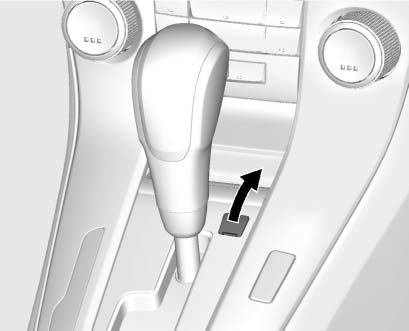
2. Open the cover to the right of the shift lever.
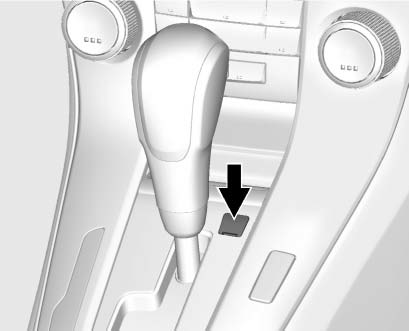
3. Insert a tool into the opening as far as it will go and move the shift lever out of P (Park).
If P (Park) is selected again, the shift lever will be locked again.
Have the cause of the problem fixed by your dealer.
4. Close the cover.
 Shifting Into Park
Use this procedure to shift into P (Park):
1. Hold the brake pedal down and set the parking brake.
2. Hold the button on the shift lever and push the lever toward the front of the
vehicle into P ( ...
 Parking
If the vehicle has a manual transmission, before getting out of the vehicle,
move the shift lever into R (Reverse), and firmly apply the parking brake. Once
the shift lever has been placed into R ...
Other materials:
Center Console Storage
The center console storage has a storage area under the armrest. Pull up on the
latch on the front of the armrest to access.
Pull up on the latch and slide the center console armrest to adjust the position.
Return the armrest to the rear position to access the storage area.
There may be an a ...
Removal Procedure
Warning: Refer to Approved Equipment for Collision Repair Warning in the
Preface section.
Warning: Refer to Glass and Sheet Metal Handling Warning in the Preface section.
Disable the SIR System. Refer to SIR Disabling
and Enabling.
Disconnect the negative battery cable. Refer to ...
Removal Procedure
Warning: Refer to Approved Equipment for Collision Repair Warning in the
Preface section.
Warning: Refer to Collision Sectioning Warning in the Preface section.
Warning: Refer to Glass and Sheet Metal Handling Warning in the Preface section.
Disable the SIR System. Refer to SIR Dis ...
