
Chevrolet Cruze Repair Manual: Installation Procedure
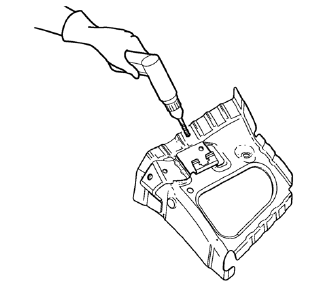
- Drill 8 mm (5/16 in) for plug welding along the edges of the front wheelhouse front panel as noted from the original panel.
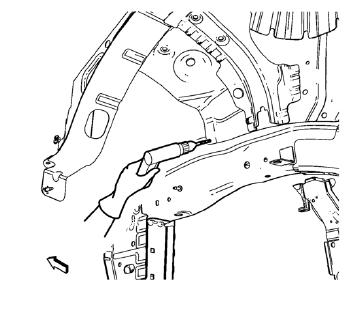
- Drill 8 mm (5/16 in) for plug welding where front wheelhouse front panel and front wheelhouse overlap.
- Clean and prepare the attaching surfaces for welding.
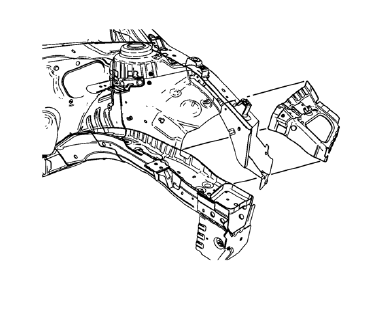
- Position the front wheelhouse front panel on the vehicle.
- Verify the fit of the front wheelhouse front panel.
- Clamp the front wheelhouse front panel into position.
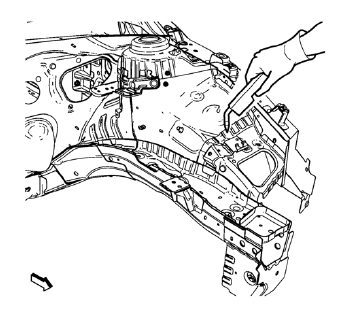
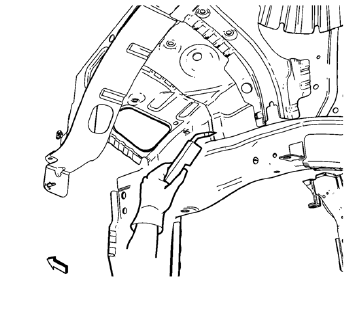
- Plug weld the joint from front wheelhouse front panel to front wheelhouse accordingly.
- Apply the sealers and anti-corrosion materials to the repair area, as necessary. Refer to Anti-Corrosion Treatment and Repair.
- Paint the repaired area. Refer to Basecoat/Clearcoat Paint Systems.
- Install all related panels and components.
- Connect the negative battery cable. Refer to Battery Negative Cable Disconnection and Connection.
- Enable the SIR system. Refer to SIR Disabling and Enabling.
 Removal Procedure
Warning: Refer to Approved Equipment for Collision Repair Warning in
the Preface section.
Warning: Refer to Glass and Sheet Metal Handling Warning in the Preface
section.
Disable the SIR Syst ...
 Front Wheelhouse Front Panel Replacement (MIG-Brazing)
Note: According to different corrosion warranties, only the
regional mandatory joining methods are allowed. ...
Other materials:
Bluetooth (Overview)
For vehicles equipped with Bluetooth capability, the system can interact with
many cell phones, allowing:
• Placement and receipt of calls in a hands-free mode.
• Sharing of the cell phone’s address book or contact list with the vehicle.
To minimize driver distraction, before driving, and with ...
Rear Bumper Fascia Guide Replacement
Preliminary Procedure
Remove the rear bumper fascia. Refer to Rear Bumper Fascia Replacement.
Rear Bumper Fascia Guide Rivet (Qty: 4)
Special Tools
BO-594-A Hand Rivet Tongs
For equivalent regional tools, refer to Special Tools.
Rear Bumper Fascia Guide
Rear Bumper Fascia Inner ...
Tyre Repair
Warning:
Tire changing can be dangerous and should be done by trained professionals
using proper tools and procedures. Always read and
understand any manufacturer's warnings contained in their customers literature
or molded into the tire sidewall.
Serious eye and ear injury may result from no ...
