
Chevrolet Cruze Owners Manual: Steering Wheel Adjustment
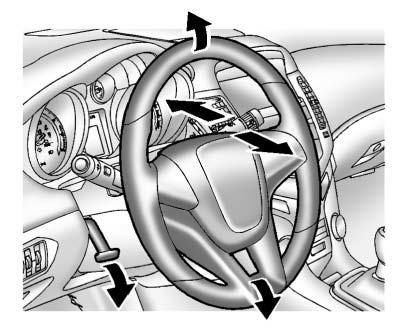
To adjust the steering wheel: 1. Pull the lever down.
2. Move the steering wheel up or down.
3. Pull or push the steering wheel closer or away from you.
4. Push the lever up to lock the steering wheel in place.
Do not adjust the steering wheel while driving.
 Controls
...
 Steering Wheel Controls
For vehicles with audio steering wheel controls, some audio controls can be adjusted
at the steering wheel.
(Push to Talk): For vehicles with
a Bluetooth, OnStar, or navigation system, press t ...
Other materials:
Lifting and Jacking the Vehicle
Note: The use of a LOW PROFILE LIFT ARMS SYSTEM may be required to
avoid unwanted contact with the vehicle's body and structure
depending on lifting equipment used. Refer to the manufacture's recommendation
for their applications of low profile lift arms system for
their lifting equipment.
...
Water Hose Test
Note: Use a water hose without the nozzle attached.
Have an assistant inside of the vehicle i 1. n order to locate the leak.
Begin testing at the base of the window or the windshield.
Slowly move the hose upward and across the top of the vehicle.
...
Traction Control System (TCS)/StabiliTrak® Light
The StabiliTrak or Traction Control System (TCS) indicator/warning light comes
on briefly when the engine is started.
If the light does not come on, have the vehicle serviced by your dealer.
If the system is working normally, the indicator light turns off.
If the light is on and not flashing, ...
