
Chevrolet Cruze Repair Manual: Air Conditioning Condenser Replacement (1.6L LDE, LXT, LXV, and 1.8L 2H0)
Removal Procedure
- Recover the refrigerant. Refer to Refrigerant Recovery and Recharging.
- Disconnect battery negative cable. Refer to Battery Negative Cable Disconnection and Connection.
- Remove front bumper fascia. Refer to Front Bumper Fascia Replacement.
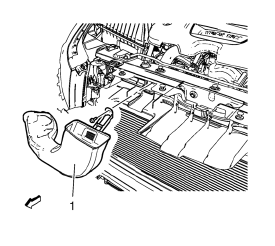
- Remove air intake duct (1).
- Remove radiator support replacement. Refer to Radiator Support Replacement.
- Remove A/C compressor and condenser hose from condenser. Refer to Air Conditioning Compressor and Condenser Hose Replacement.
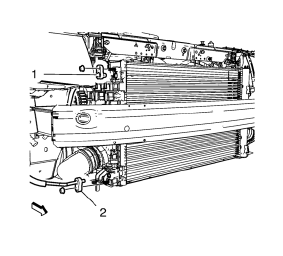
- Remove condenser hose bolt and condenser hose (1, 2).
- Remove A/C refrigerant pressure sensor. Refer to Air Conditioning (A/C) Refrigerant Pressure Sensor Replacement.
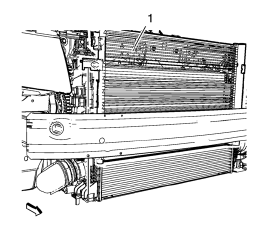
- Remove condenser.
Installation Procedure
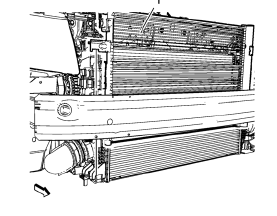
- Install condenser.
- Install A/C refrigerant pressure sensor. Refer to Air Conditioning (A/C) Refrigerant Pressure Sensor Replacement.
Caution: Refer to Fastener Caution in the Preface section.
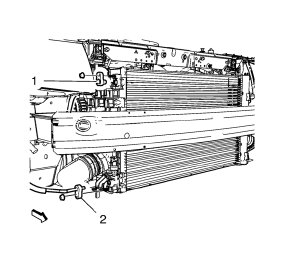
- Install condenser hose (1, 2) and condenser hose bolt and tighten to 19 N·m (15 lb ft).
- Install A/C compressor and condenser hose to condenser. Refer to Air Conditioning Compressor and Condenser Hose Replacement
- Install radiator support. Refer to Radiator Support Replacement.
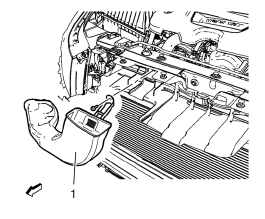
- Install air intake duct (1).
- Install front bumper fascia. Refer to Front Bumper Fascia Replacement.
- Connect battery negative cable. Refer to Battery Negative Cable Disconnection and Connection.
- Evacuate and charge the refrigerant system. Refer to Refrigerant Recovery and Recharging.
 Air Conditioning Evaporator Hose Assembly Replacement
Preliminary Procedures
Recover the refrigerant. Refer to Refrigerant Recovery and Recharging.
Remove the headlamp - right side. Refer to Headlamp Replacement.
Loosen power steering fluid r ...
 Instrument Panel Outer Air Outlet Replacement - Left Side
Preliminary Procedure
Remove instrument panel lower trim pad cover - left side. Refer to
Instrument Panel Lower Trim Pad Cover Replacement.
Remove instrument panel cluster trim plat ...
Other materials:
Rear Side Door Window Replacement
Preliminary Procedures
Position the window approximately half way down in the door.
Remove the water deflector. Refer to Rear Side Door Water Deflector
Replacement.
Remove the outer sealing strip. Refer to Rear Side Door Window Outer
Sealing Strip Replacement.
Rear Side ...
Rear Side Door Window Regulator Motor Replacement
Preliminary Procedure
Remove the rear side door window regulator. Refer to Rear Side Door Window
Regulator Replacement.
Rear Side Door Window Regulator Motor Screw (Qty: 3)
Caution: Refer to Fastener Caution in the Preface section.
Tighten
9 N·m (80 lb in)
Rear Side Door Window R ...
Front Side Door Replacement
Preliminary Procedure
Remove the front side door trim panel. Refer to Front Side Door Trim
Replacement.
Front Side Door Check Link Bolt
Caution: Refer to Fastener Caution in the Preface section.
Procedure
Remove the water deflector.
Disconnect the door electrical connector.
Su ...
