
Chevrolet Cruze Repair Manual: Floor Air Outlet Replacement
Removal Procedure
- Remove the instrument panel assembly. Refer to Instrument Panel Assembly Replacement.
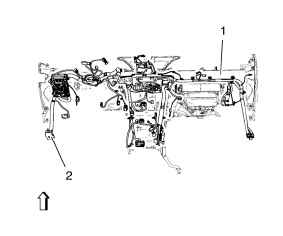
- Remove the instrument panel wiring harness (2) from the instrument panel tie bar (1).
Disconnect the electrical connectors.
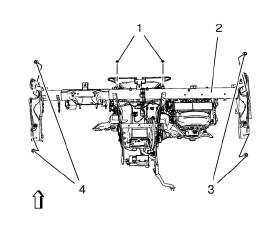
- Remove the instrument panel tie bar (2).
- Remove the 4 instrument panel tie bar bolts (3, 4).
- Remove the 2 instrument panel tie bar nuts (1).
- Remove the heater wiring harness.
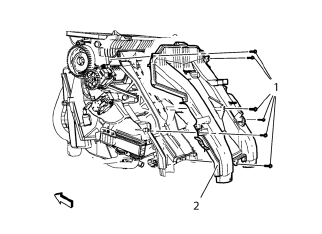
- Remove the floor air outlet (2).
Remove the 6 floor air outlet bolts (1).
Installation Procedure
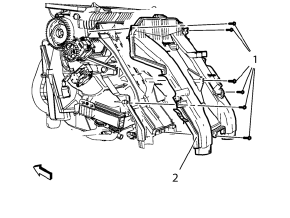
Caution: Refer to Fastener Caution in the Preface section.
- Install the floor air outlet (2).
Install the 6 floor air outlet bolts (1) and tighten to 2.5 N·m (23 lb in).
- Install the heater wiring harness.
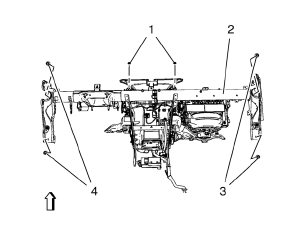
- Install the instrument panel tie bar (2).
- Install the 4 instrument panel tie bar bolts (3, 4) and tighten to 22 N·m (17 lb ft).
- Install the 2 instrument panel tie bar nuts (1) and tighten to 9 N·m (80 lb in).
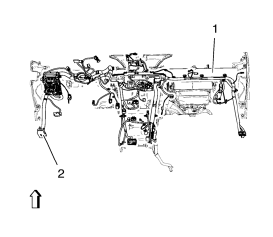
- Attach the instrument panel wiring harness (2) to the instrument panel tie bar (1).
Connect the electrical connectors.
- Install the instrument panel assembly. Refer to Instrument Panel Assembly Replacement.
 Instrument Panel Outer Air Outlet Replacement - Left Side
Preliminary Procedure
Remove instrument panel lower trim pad cover - left side. Refer to
Instrument Panel Lower Trim Pad Cover Replacement.
Remove instrument panel cluster trim plat ...
 Instrument Panel Outer Air Outlet Duct Replacement
Preliminary Procedure
Remove instrument panel assembly. Refer to Instrument Panel Assembly
Replacement.
Instrument Panel Outer Air Outlet Duct Screw (Qty: 7)
Caution: Refer to Fastener Cautio ...
Other materials:
AM-FM Radio
Control Buttons
The buttons used to control the radio are: BAND: Press to turn the radio
on and choose between AM, FM, and SiriusXM®, if equipped.
MENU/SEL: Turn to navigate the available menus and to search for stations.
INFO: Press to display additional information that may be available for
...
Safety Locks
The rear door safety locks prevent passengers from opening the rear doors from
inside the vehicle.
Press to activate the safety locks.
The indicator light comes on when activated.
The rear door power windows are also disabled.
Press again to deactivate the safety
locks and power windows ...
Doing Your Own Service Work
WARNING
It can be dangerous to work on your vehicle if you do not have the proper
knowledge, service manual, tools, or parts. Always follow owner manual procedures
and consult the service manual for your vehicle before doing any service work.
If doing some of your own service work, use the pro ...
