
Chevrolet Cruze Owners Manual: Floor Mats
WARNING
If a floor mat is the wrong size or is not properly installed, it can interfere with the pedals.
Interference with the pedals can cause unintended acceleration and/or increased stopping distance which can cause a crash and injury. Make sure the floor mat does not interfere with the pedals.
Use the following guidelines for proper floor mat usage: • The original equipment floor mats were designed for your vehicle. If the floor mats need replacing, it is recommended that GM certified floor mats be purchased. Non-GM floor mats may not fit properly and may interfere with the pedals. Always check that the floor mats do not interfere with the pedals.
• Use the floor mat with the correct side up. Do not turn it over.
• Do not place anything on top of the driver side floor mat.
• Use only a single floor mat on the driver side.
• Do not place one floor mat on top of another.
Removing and Replacing the Floor Mats
Pull up on the rear of the floor mat to unlock each retainer and remove.
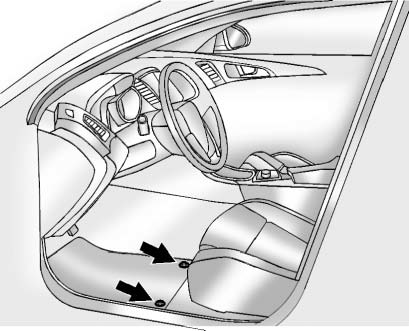
Reinstall by lining up the floor mat retainer openings over the carpet retainers and snapping into position.
Make sure the floor mat is properly secured in place.
Verify the floor mat does not interfere with the pedals.
 Interior Care
To prevent dirt particle abrasions, regularly clean the vehicle's interior.
Immediately remove any soils. Note that newspapers or dark garments that can
transfer color to home furnishings can a ...

Other materials:
Removal Procedure
Warning: Refer to Approved Equipment for Collision Repair Warning in the
Preface section.
Warning: Refer to Collision Sectioning Warning in the Preface section.
Warning: Refer to Glass and Sheet Metal Handling Warning in the Preface section.
Disable the SIR System. Refer to SIR Dis ...
Additional Maintenance and Care
Your vehicle is an important investment and caring for it properly may help to
avoid future costly repairs. To maintain vehicle performance, additional maintenance
services may be required. It is recommended that your dealer perform these services
— their trained dealer technicians know your v ...
Inflatable Restraint Module Handling and Scrapping
Special Tools
EL-38826 SIR Deployment Harness
EL-39401-B SIR Deployment Fixture
For equivalent regional tools, refer to Special Tools.
Live and Undeployed Inflator Module
Warning: Refer to SIR Inflator Module Handling and Storage Warning
in the Preface section.
Take special care when h ...
