
Chevrolet Cruze Owners Manual: Head Restraints
The vehicle's front and rear seats have adjustable head restraints in the outboard seating positions.
WARNING
With head restraints that are not installed and adjusted properly, there is a greater chance that occupants will suffer a neck/ spinal injury in a crash. Do not drive until the head restraints for all occupants are installed and adjusted properly.
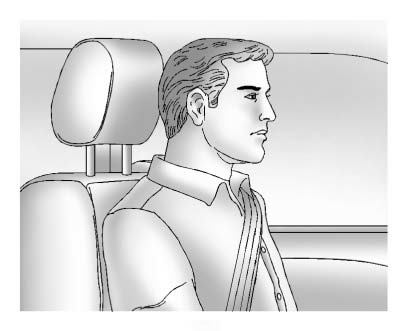
Adjust the head restraint so that the top of the restraint is at the same height as the top of the occupant's head. This position reduces the chance of a neck injury in a crash.
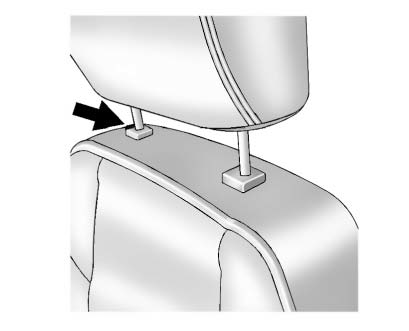
The height of the head restraint can be adjusted. Pull the head restraint up to raise it. Try to move the head restraint to make sure that it is locked in place.
To lower the head restraint, press the button, located on the top of the seatback, and push the head restraint down. Try to move the head restraint after the button is released to make sure that it is locked in place.
The front seat outboard head restraints are not designed to be removed.

 Front Seats
...
Other materials:
Removal Procedure
Warning: Refer to Approved Equipment for Collision Repair Warning in the
Preface section.
Warning: Refer to Glass and Sheet Metal Handling Warning in the Preface section.
Disable the SIR System. Refer to SIR Disabling and Enabling.
Disconnect the negative battery cable. Refer to Battery N ...
Engine Air Cleaner/Filter
When to Inspect the Engine Air Cleaner/Filter
Inspect the air cleaner/filter at the scheduled maintenance intervals and replace
it at the first oil change after each 80 000 km (50,000 mi) interval. If you are
driving in dusty/dirty conditions, inspect the filter at each engine oil change.
How ...
Instrument Panel Accessory Bezel Replacement
Preliminary Procedure
Remove transmission control cover. Refer to Automatic or Manual Transmission
Control Lever Trim Cover Replacement.
Instrument Panel Accessory Bezel Screw (Qty: 4)
Caution: Refer to Fastener Caution in the Preface section.
Tighten
2.5 N·m (23 lb in).
Instrume ...
