
Chevrolet Cruze Owners Manual: Mirror Adjustment
Exterior
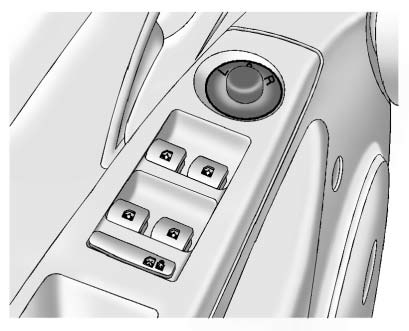
Controls for the outside power mirrors are on the driver door.
1. Turn the selector switch to L (Left) or R (Right) to choose the driver or passenger mirror.
2. Move the control to adjust the mirror.
3. Turn the selector switch to the O position to deselect the mirror.
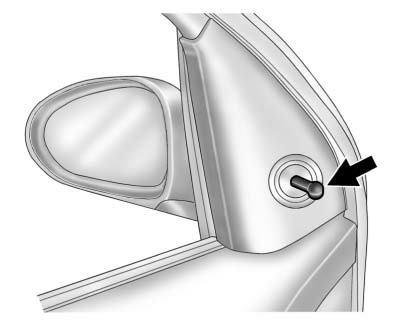
Vehicles with a manual mirror adjustment have controls next to each mirror.
Interior Mirror
Adjustment
Adjust the rearview mirror to view the area behind the vehicle.
Manual Rearview Mirror
If equipped with a manual rearview mirror, push the tab forward for daytime use and pull it for nighttime use to avoid glare from the headlamps from behind
Automatic Dimming Rearview Mirror
If equipped with an automatic dimming rearview mirror, the mirror will automatically reduce the glare of headlamps from behind. The dimming feature and indicator light come on each time the vehicle is started.
 Passenger Sensing System
United States
Canada
The passenger sensing system turns off the front outboard passenger frontal airbag
and knee airbag under certain conditions. No other airbag is affected by the passenger
...
 Steering Wheel Adjustment
To adjust the steering wheel:
1. Pull the lever down.
2. Move the steering wheel up or down.
3. Pull or push the steering wheel closer or away from you.
4. Push the lever up to lock the steering ...
Other materials:
Overview
Read the following pages to become familiar with the infotainment system features.
WARNING
Taking your eyes off the road for extended periods could cause a crash resulting
in injury or death to you or others. Do not give extended attention to infotainment
tasks while driving.
The infotainment ...
Instrument Panel Tie Bar Replacement (Right Hand Drive)
Removal Procedure
Remove instrument panel compartment. Refer to Instrument Panel
Compartment Replacement.
Remove instrument panel wiring harness (2) from instrument panel tie bar
(1).
Disconnect electrical connectors.
Remove instrument panel tie bar (1).
Remov ...
Instrument Panel
Instrument Panel Overview
1. Exterior Lamp Controls
Front Fog Lamps
Instrument Panel Illumination Control
2. Air Vents
3. Headlamp High/Low-Beam Changer
Turn Signal Lever.
Driver Information Center (DIC) Buttons.
4. Instrument Cluster
5. Driver Information Center (DIC)
6. Steering Wheel ...
