
Chevrolet Cruze Owners Manual: Steering Wheel Adjustment
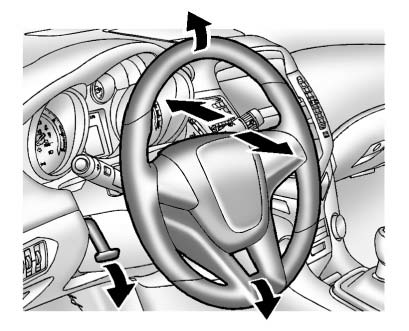
To adjust the steering wheel: 1. Pull the lever down.
2. Move the steering wheel up or down.
3. Pull or push the steering wheel closer or away from you.
4. Push the lever up to lock the steering wheel in place.
Do not adjust the steering wheel while driving.
 Mirror Adjustment
Exterior
Controls for the outside power mirrors are on the driver door.
1. Turn the selector switch to L (Left) or R (Right) to choose the driver or
passenger mirror.
2. Move the control to adj ...
 Interior Lighting
Dome Lamps
The dome lamp controls are located in the headliner.
: Press to turn the lamps off, even
when a door is open.
: Press to turn the lamps on automatically
when a door is opened.
: ...
Other materials:
Engine Air Cleaner/Filter
When to Inspect the Engine Air Cleaner/Filter
Inspect the air cleaner/filter at the scheduled maintenance intervals and replace
it at the first oil change after each 80 000 km (50,000 mi) interval. If you are
driving in dusty/dirty conditions, inspect the filter at each engine oil change.
How ...
Windshield Washer Nozzle Hose Replacement
Preliminary Procedure
Remove the hood insulator. Refer to
Hood Insulator Replacement.
Place a clean container under the front driver side near where the
windshield washer nozzle and windshield washer pump
hose will be disconnected.
Recover all lost windshield washer solven ...
Accident With or Without Air Bag Deployment - Component Inspections
Warning: Proper operation of the Supplemental Inflatable Restraint
(SIR) sensing system requires that any repairs to the vehicle
structure return the vehicle structure to the original production configuration.
Not properly repairing the vehicle structure could cause
non-deployment of the air b ...
