
Chevrolet Cruze Owners Manual: Sun Visors
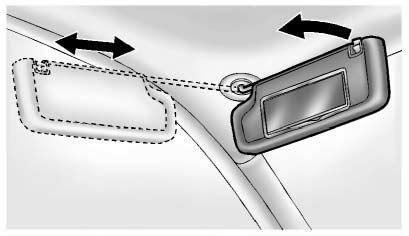
Pull the sun visor down to block glare. Detach the sun visor from the center mount to pivot to the side window, or to extend along the rod, if available.
 Power Windows
WARNING
Children could be seriously injured or killed if caught in the path of a closing
window. Never leave keys in a vehicle with children. When there are children in
the rear seat, use the win ...
 Roof
Roof
Sunroof
The sunroof only operates when the ignition is in ON/RUN or ACC/ ACCESSORY, or
when Retained Accessory Power (RAP) is active.
To open or close the sunroof, press the open or close sunroo ...
Other materials:
Removal Procedure
Warning: Refer to Approved Equipment for Collision Repair Warning in
the Preface section.
Disable the SIR System. Refer to SIR Disabling
and Enabling.
Disconnect the negative battery cable. Refer to Battery Negative Cable
Disconnection and Connection.
Remove all related panels ...
Door Locks
WARNING
Unlocked doors can be dangerous.
• Passengers, especially children, can easily open the doors and fall out of
a moving vehicle. The chance of being thrown out of the vehicle in a crash is increased
if the doors are not locked. So, all passengers should wear safety belts properly
and ...
Mitsubishi Outlander Plug-In Hybrid Award in 2024
The Mitsubishi Outlander Plug-in Hybrid is a remarkable blend of clean electric motoring and the convenience of gasoline refueling. Designed as a seven-passenger SUV, it caters to drivers who want to embrace eco-friendly options without fully committing to all-electric vehicles. Mark Chaffin, ...
