
Chevrolet Cruze Owners Manual: Roof
Sunroof
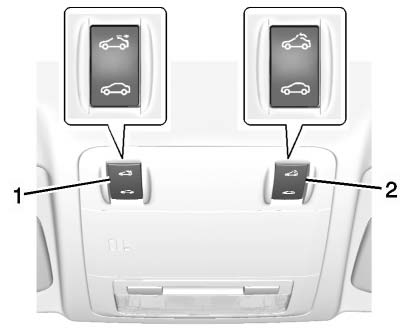
The sunroof only operates when the ignition is in ON/RUN or ACC/ ACCESSORY, or when Retained Accessory Power (RAP) is active.
To open or close the sunroof, press the open or close sunroof switch (1) to the first detent position.
To express open or close the sunroof with the safety function enabled, press the open or close sunroof switch (1) to the second detent position and release. To stop the movement, press the switch again.
To automatically tilt or close the sunroof, press the tilt open or close sunroof switch (2).
If an object is in the path of the sunroof while it is closing, the anti-pinch feature will detect the object and stop the sunroof.
The sunroof glass panel cannot be opened or closed if the vehicle has an electrical failure.
Sunshade
The sunshade is manually operated.
Close or open the sunshade by sliding. When the sunroof is opened, the sunshade is always open.
Safety Function
If the sunroof has any resistance during automatic closing, it will immediately stop and reverse.
To override the safety function, press and hold the close sunroof switch. The sunroof closes without the safety function. To stop the movement, release the switch.
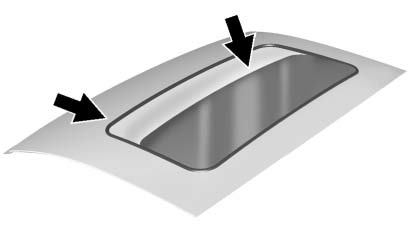
Dirt and debris may collect on the sunroof seal or in the track. This could cause an issue with sunroof operation, noise, or plugging within the water drainage system.
Periodically open the sunroof and remove any obstacles or loose debris. Wipe the sunroof seal and roof sealing area using a clean cloth, mild soap, and water. Do not remove grease from the sunroof.
If water is seen dripping into the water drainage system, this is normal.
 Sun Visors
Pull the sun visor down to block glare. Detach the sun visor from the center
mount to pivot to the side window, or to extend along the rod, if available. ...

Other materials:
GM Mobility Reimbursement Program
This program is available to qualified applicants for cost reimbursement of eligible
aftermarket adaptive equipment required for the vehicle, such as hand controls or
a wheelchair/ scooter lift for the vehicle.
For more information on the limited offer, visit www.gmmobility.com or call the
...
Windshield Wiper Arm Replacement
Windshield Washer Arm Finish Cap
Tip
Use a small flat-bladed tool to remove finish cap.
Special Tools
BO-6626 Wiper Arm Puller
For equivalent regional tools, refer to Special Tools.
Windshield Washer Arm Nut
Caution: Refer to Fastener Caution in the Preface section.
Procedure
...
Frame and Underbody
Specifications
Engine Shield Replacement
Preliminary Procedure
Raise and support the vehicle. Refer to Lifting and Jacking the Vehicle.
Engine Shield Bolt (Qty: 4)
Caution: Refer to Fastener Caution in the Preface section.
Tighten
40 N·m (30 lb ft)
Engine Shield
Front Comp ...
