
Chevrolet Cruze Repair Manual: Installation Procedure
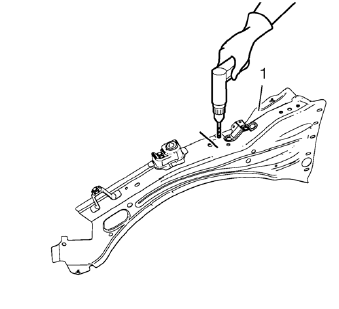
- Create 5 x 18 mm (4/16 x 11/16 in) slots for MIG-brazing (1).
- Clean and prepare the attaching surfaces for spot welding and brazing.
Note: In MIG-brazing areas 50 mm (2 in) must be kept clear of structural adhesive.
- Apply structural adhesive to all attaching surfaces.
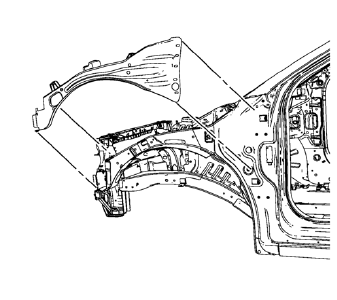
- Position the front compartment upper side rail on the vehicle.
- Verify the fit of the front compartment upper side rail.
- Clamp the front compartment upper side rail into position.
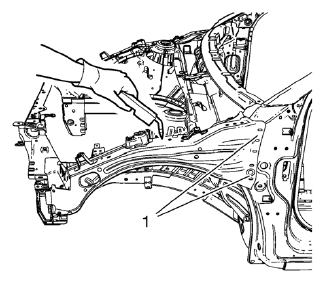
Note: MIG-braze factory slots in the front hinge pillar body area (1) as noted from the original panel.
- Braze accordingly.
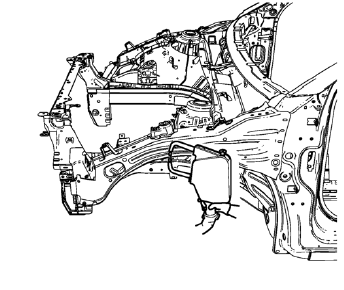
- Spot weld accordingly.
- Apply the sealers and anti-corrosion materials to the repair area, as necessary. Refer to Anti-Corrosion Treatment and Repair.
- Paint the repaired area. Refer to Basecoat/Clearcoat Paint Systems.
- Install all related panels and components.
- Connect the negative battery cable. Refer to Battery Negative Cable Disconnection and Connection.
- Enable the SIR system. Refer to SIR Disabling and Enabling.
 Removal Procedure
Warning: Refer to Approved Equipment for Collision Repair Warning in the
Preface section.
Warning: Refer to Glass and Sheet Metal Handling Warning in the Preface section.
Disable the SIR Syst ...
 Front Compartment Upper Side Rail Sectioning (MAG-Welding)
Note: According to different corrosion warranties, only the
regional mandatory joining methods are allowed. ...
Other materials:
Safety Locks
The rear door safety locks prevent passengers from opening the rear doors from
inside the vehicle.
Press to activate the safety locks.
The indicator light comes on when activated.
The rear door power windows are also disabled.
Press again to deactivate the safety
locks and power windows ...
Doing Your Own Service Work
WARNING
It can be dangerous to work on your vehicle if you do not have the proper
knowledge, service manual, tools, or parts. Always follow owner manual procedures
and consult the service manual for your vehicle before doing any service work.
If doing some of your own service work, use the pro ...
Rear Wheel Bearing and Hub Replacement (Drum Brake)
Special Tools
EN 45059 Torque Angle Sensor Kit
For equivalent regional tools, refer to Special Tools.
Removal Procedure
Raise and suitably support the vehicle. Refer to Lifting and
Jacking the Vehicle.
Remove the tire and wheel assembly. Refer to Tire and Wheel Removal and
...
