
Chevrolet Cruze Repair Manual: Removal Procedure
Warning: Refer to Approved Equipment for Collision Repair Warning in the Preface section.
Warning: Refer to Glass and Sheet Metal Handling Warning in the Preface section.
- Disable the SIR System. Refer to SIR Disabling and Enabling.
- Disconnect the negative battery cable. Refer to Battery Negative Cable Disconnection and Connection.
- Remove all related panels and components
- Visually inspect the damage. Repair as much of the damage as possible.
- Remove the sealers and anti-corrosion materials from the repair area, as necessary. Refer to Anti-Corrosion Treatment and Repair.
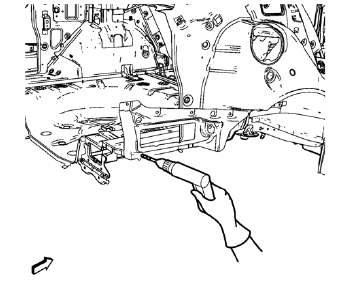
- Locate and mark all the necessary factory welds of the body side outer lower panel.
Note: Note the number and location of welds for installation of the service assembly.
- Drill all factory welds.
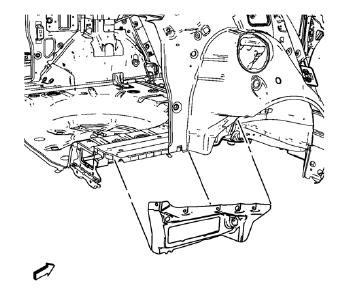
- Remove the body side outer lower panel.
 Body Side Outer Lower Panel Replacement (MAG-Welding)
Note: According to different corrosion warranties, only the
regional mandatory joining methods are allowed. ...
 Installation Procedure
Drill 8 mm (5/16 in) for plug welding along the edges of the body side
outer lower panel as noted from the original panel.
Note: If the location of the original plug weld holes can not be ...
Other materials:
Maps
This section includes basic information about the map database.
The data is stored in the internal flash memory that is used in the navigation
system.
Detailed Areas
Road network attributes are contained in the map database for detailed areas.
Attributes include information such as street nam ...
Installation Procedure
Cut the quarter outer panel in corresponding locations to fit the
remaining original panel. The sectioning joint should be trimmed to
allow a gap of one-and-one-half-times the metal thickness at the sectioning
joint.
Create a 50 mm (2 in) backing plate from the unused portion
&nbs ...
Windshield Washer Nozzle Hose Replacement
Preliminary Procedure
Remove the hood insulator. Refer to
Hood Insulator Replacement.
Place a clean container under the front driver side near where the
windshield washer nozzle and windshield washer pump
hose will be disconnected.
Recover all lost windshield washer solven ...
