
Chevrolet Cruze Repair Manual: Removal Procedure
Warning: Refer to Approved Equipment for Collision Repair Warning in the Preface section.
- Disable the SIR System. Refer to SIR Disabling and Enabling.
- Disconnect the negative battery cable. Refer to Battery Negative Cable Disconnection and Connection.
- Remove all related panels and components.
- Visually inspect the damage. Repair as much of the damage as possible.
- Remove the sealers and anti-corrosion materials from the repair area, as necessary. Refer to Anti-Corrosion Treatment and Repair.
- Locate and mark all factory welds.
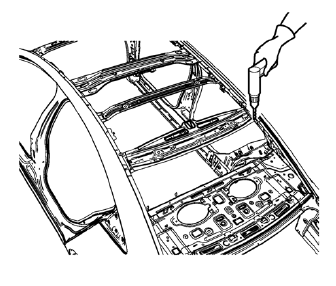
- Drill all factory welds. Note the number and location of welds for installation of the service assembly.
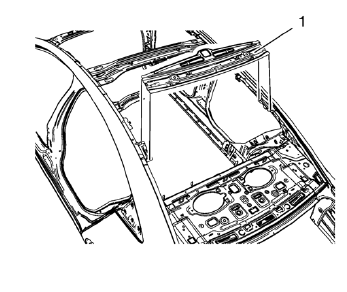
- Remove the damaged roof rear header panel (1).
 Roof Rear Header Panel Replacement (MIG-Brazing)
Note: According to different corrosion warranties, only the
regional mandatory joining methods are allowed. ...
 Installation Procedure
Clean and prepare the attaching surfaces for welding.
Position the roof rear header panel (1) on the vehicle.
Verify the fit of the panel.
Clamp the roof rear header panel into positi ...
Other materials:
Removal Procedure
Warning: Refer to Approved Equipment for Collision Repair Warning in the
Preface section.
Warning: Refer to Collision Sectioning Warning in the Preface section.
Warning: Refer to Glass and Sheet Metal Handling Warning in the Preface section.
Disable the SIR System. Refer to SIR Dis ...
New Vehicle Break-In
Notice: The vehicle does not need an elaborate break-in. But it will
perform better in the long run if you follow these guidelines:
• Do not drive at any one constant speed, fast or slow, for the first 805 km (500
mi).
Do not make full-throttle starts. Avoid downshifting to brake or slow the v ...
Vehicle Personalization
The audio system controls are used to access the personalization menus for customizing
vehicle features.
CONFIG (Configuration): Press to access the Configuration Settings menu.
MENU/SEL: Press the center of this knob to enter the menus and select
menu items. Turn the knob to scroll through th ...
