
Chevrolet Cruze Repair Manual: Rear Spring Replacement
Removal Procedure
- Raise and suitably support the vehicle. Refer to Lifting and Jacking the Vehicle.
- Support the rear axle with a tall jack stand near the shock absorber.
- Remove the lower shock bolt. Refer to Shock Absorber Replacement.
- Using the tall jack stands, slowly lower the rear axle in order to remove tension from the rear springs.
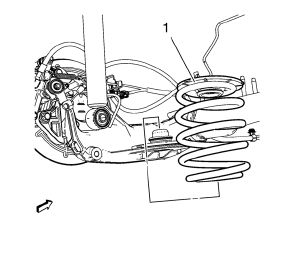
- Remove the spring (1).
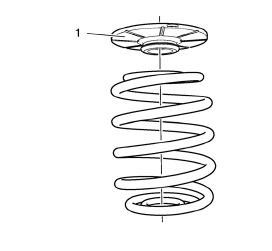
- Remove the upper spring seat/jounce bumper (1) from the spring, while leaving the lower spring seat on the axle.
Installation Procedure
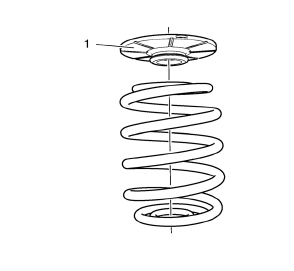
- Install the upper spring seat/jounce bumper (1) on the spring.
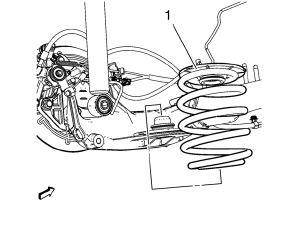
- Install the spring (1) making sure the lower coil is seated into the lower spring seat.
- Using the jack stands, raise the rear axle in order to compress the rear springs.
- Install the lower shock absorber bolts. Refer to Shock Absorber Replacement.
- Lower the vehicle.
 Rear Spring Insulator Replacement
Removal Procedure
Raise and suitably support the vehicle. Refer to Lifting and Jacking the
Vehicle.
Support the rear axle with a tall jack stand near the shock absorber.
Remove the lower sh ...
 Rear Axle Replacement
Special Tools
EN 45059 Torque Angle Sensor Kit
For equivalent regional tools, refer to Special Tools.
Removal Procedure
Raise and suitably support the vehicle. Refer to Lifting and ...
Other materials:
Operation
Controls
The infotainment system is operated by using the pushbuttons, multifunction knobs,
menus shown on the display, and steering wheel controls, if equipped.
Turning the System On or Off
(Volume/Power): Press to turn the
system on and off.
Automatic Switch-Off
If the infotainment syste ...
Exterior Windnoise
Warning: Refer to Assistant Driving Warning in the Preface section.
Exterior windnoise is louder when the vehicle is driven with one or more
windows down. Exterior windnoise occurs when air passes over
the body panels, the seams, or the openings. Use the following items during the
test drive i ...
Side Blind Zone Alert (SBZA)
The vehicle may have a Side Blind Zone Alert (SBZA) system. Read this entire
section before using the system.
WARNING
SBZA does not detect vehicles rapidly approaching outside of the side blind
zones, pedestrians, bicyclists, or animals. Failure to use proper care when changing
lanes may res ...
