
Chevrolet Cruze Repair Manual: Installation Procedure
- Clean and prepare the attaching surfaces for welding.
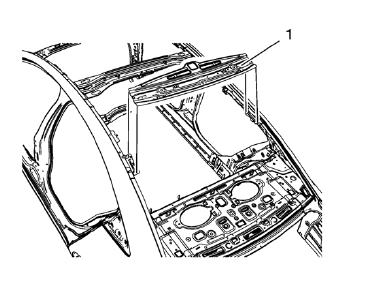
- Position the roof rear header panel (1) on the vehicle.
- Verify the fit of the panel.
- Clamp the roof rear header panel into position.
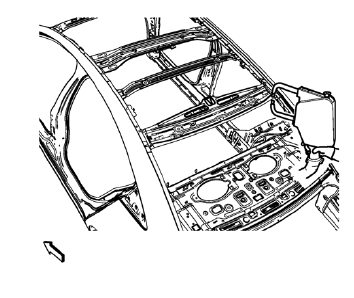
- Spot weld accordingly as noted from the original panel.
- Apply the sealers and anti-corrosion materials to the repair area, as necessary. Refer to Anti-Corrosion Treatment and Repair.
- Paint the repaired area. Refer to Basecoat/Clearcoat Paint Systems.
- Install all related panels and components.
- Connect the negative battery cable. Refer to Battery Negative Cable Disconnection and Connection.
- Enable the SIR system. Refer to SIR Disabling and Enabling.
 Removal Procedure
Warning: Refer to Approved Equipment for Collision Repair Warning in the
Preface section.
Disable the SIR System. Refer to SIR Disabling and Enabling.
Disconnect the negative battery cab ...
 Rocker Inner Panel Replacement (MAG-Welding)
Note: According to different corrosion warranties, only the
regional mandatory joining methods are allowed. ...
Other materials:
Steering Linkage Outer Tie Rod Replacement
Preliminary Procedure
Remove the tire and wheel assembly. Refer to Tire and Wheel Removal and
Installation.
Steering Linkage Tie Rod Nut
Caution: Refer to Fastener Caution in the Preface section.
Tighten
35 N·m (26 lb ft)
Steering Linkage Inner Tie Rod Nut
Tighten
60 N·m (44 ...
Rear Bumper Fascia Replacement
Preliminary Procedure
Remove the tail lamps. Refer to Tail Lamp Replacement.
Rear Bumper Fascia Retainer (Qty: 2)
Rear Wheelhouse Liner Bolt (Qty: 6)
Caution: Refer to Fastener Caution in the Preface section.
Tighten
2.5 N·m (23 lb in)
Rear Bumper Fascia
Procedure
Pull th ...
Removal Procedure
Warning: Refer to Approved Equipment for Collision Repair Warning in the
Preface section.
Warning: Refer to Collision Sectioning Warning in the Preface section.
Warning: Refer to Glass and Sheet Metal Handling Warning in the Preface section.
Disable the SIR System. Refer to SIR &nbs ...
