
Chevrolet Cruze Owners Manual: Reclining Seatbacks
WARNING
If either seatback is not locked, it could move forward in a sudden stop or crash. That could cause injury to the person sitting there.
Always push and pull on the seatbacks to be sure they are locked.
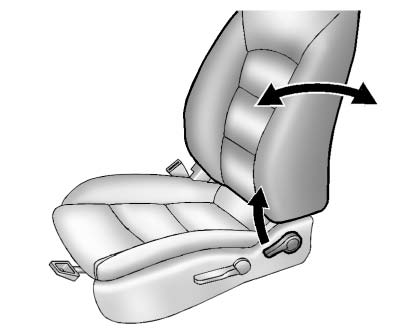
To recline the seatback: 1. Lift the lever.
If necessary, move the safety belt out of the way to access the lever.
2. Move the seatback to the desired position, then release the lever to lock the seatback in place.
3. Push and pull on the seatback to make sure it is locked.
To return the seatback to an upright position: 1. Lift the lever fully without applying pressure to the seatback, and the seatback returns to the upright position.
2. Push and pull on the seatback to make sure it is locked.
WARNING
Sitting in a reclined position when the vehicle is in motion can be dangerous. Even when buckled up, the safety belts cannot do their job.
The shoulder belt will not be against your body. Instead, it will be in front of you. In a crash, you could go into it, receiving neck or other injuries.
The lap belt could go up over your abdomen. The belt forces would be there, not at your pelvic bones. This could cause serious internal injuries.
For proper protection when the vehicle is in motion, have the seatback upright. Then sit well back in the seat and wear the safety belt properly.
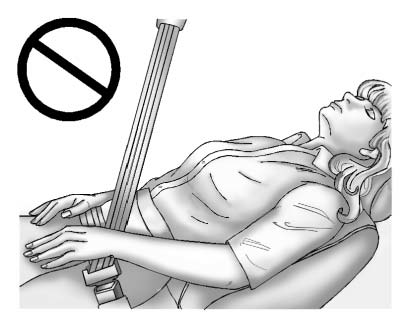
Do not have a seatback reclined if the vehicle is moving.
 Power Seat Adjustment
To adjust the power driver seat, if equipped:
• Move the seat forward or rearward by sliding the control forward or rearward.
• Raise or lower the front part of the seat cushion by moving th ...
 Heated Front Seats
WARNING
If you cannot feel temperature change or pain to the skin, the seat heater
may cause burns. To reduce the risk of burns, people with such a condition should
use care when using the seat h ...
Other materials:
Checking and Adding Power Steering Fluid
Caution: When adding fluid or making a complete fluid change, always
use the proper power steering fluid. Failure to use the proper fluid
will cause hose and seal damage and fluid leaks.
Clean the area surrounding the reservoir cap.
Remove the reservoir cap.
Inspect the power steeri ...
Wheel Replacement
Replace any wheel that is bent, cracked, or badly rusted or corroded. If wheel
nuts keep coming loose, the wheel, wheel bolts, and wheel nuts should be replaced.
If the wheel leaks air, replace it.
Some aluminum wheels can be repaired. See your dealer if any of these conditions
exist.
Your de ...
Transmission
Driver Shift Control (DSC) allows the automatic transmission to be shifted similar
to a manual transmission.
Electronic Range Select (ERS) allows for the selection of a range of gears.
Up-Shift Light
If the vehicle has a manual transmission, it will have an up-shift light that
indicates whe ...
