
Chevrolet Cruze Owners Manual: Additional Storage Features
Cargo Tie-Downs
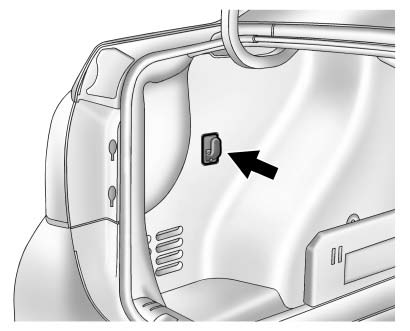
On the driver side in the rear compartment is a retainer to hang light items on.
 Center Console Storage
The center console storage has a storage area under the armrest. Pull up on the
latch on the front of the armrest to access.
Pull up on the latch and slide the center console armrest to adjust th ...

Other materials:
Checking and Adding Power Steering Fluid
Caution: When adding fluid or making a complete fluid change, always
use the proper power steering fluid. Failure to use the proper fluid
will cause hose and seal damage and fluid leaks.
Clean the area surrounding the reservoir cap.
Remove the reservoir cap.
Inspect the power steeri ...
Instrument Panel Upper Compartment Replacement
Instrument Panel Upper Compartment Screw (Qty: 2)
Caution: Refer to Fastener Caution in the Preface section.
Procedure
Before removing the instrument panel upper compartment screws, remove mat.
Tighten
2.5 N·m (23 lb in)
Instrument Panel Upper Compartment Assembly
...
Hands-Free Phone
Using Bluetooth Voice Recognition
To use voice recognition, press the
button on the steering wheel.
Use the commands below for the various voice features. For additional information,
say “Help” while in a voice recognition menu.
Making a Call
Calls can be made using the following commands.
...
