
Chevrolet Cruze Owners Manual: Seat Adjustment
WARNING
You can lose control of the vehicle if you try to adjust a driver seat while the vehicle is moving.
Adjust the driver seat only when the vehicle is not moving.
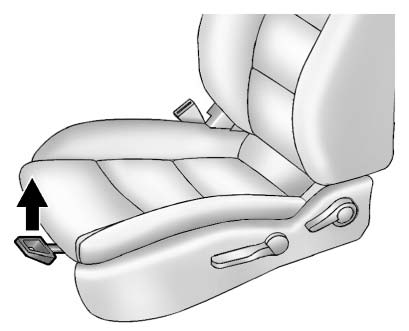
To adjust a manual seat: 1. Pull the handle at the front of the seat.
2. Slide the seat to the desired position and release the handle.
3. Try to move the seat back and forth to be sure it is locked in place.
Seat Height Adjuster
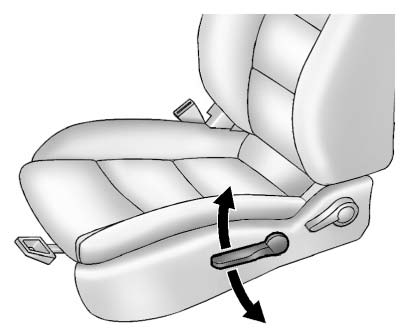
If available, move the lever up or down to manually raise or lower the seat.
 Front Seats
...
 Power Seat Adjustment
To adjust the power driver seat, if equipped:
• Move the seat forward or rearward by sliding the control forward or rearward.
• Raise or lower the front part of the seat cushion by moving th ...
Other materials:
Wiper/Washer System Description and Operation
Wiper/Washer System Components
The wiper/washer system consists of the following electrical components:
Windshield Wiper Relay
Windshield Wiper Speed Control Relay
Windshield Washer Pump Relay
Rain Sensor (optional)
Windshield Washer Fluid Pump
Windshield Wiper Motor
Window Wiper/Wa ...
Removal Procedure
Warning: Refer to Approved Equipment for Collision Repair Warning in the
Preface section.
Warning: Refer to Glass and Sheet Metal Handling Warning in the Preface section.
Disable the SIR System. Refer to SIR Disabling
and Enabling.
Disconnect the negative battery cable. Refer to Batter ...
Tire Changing
Removing the Spare Tire and Tools
To access the spare tire and tools:
1. Retainer Nut.
2. Tool Bag Tether.
3. Tool Bag.
4. Spare Tire.
1. Open the trunk.
2. Lift the load floor.
3. Turn the retainer nut (1) counterclockwise to remove it.
Then remove the tool bag tether (2) from th ...
