
Chevrolet Cruze Owners Manual: Power Seat Adjustment
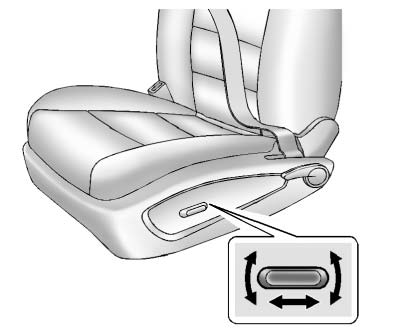
To adjust the power driver seat, if equipped: • Move the seat forward or rearward by sliding the control forward or rearward.
• Raise or lower the front part of the seat cushion by moving the front of the control up or down.
• Raise or lower the entire seat by moving the rear of the control up or down.
To adjust the seatback.
 Seat Adjustment
WARNING
You can lose control of the vehicle if you try to adjust a driver seat while
the vehicle is moving.
Adjust the driver seat only when the vehicle is not moving.
To adjust a manual seat:
...
 Reclining Seatbacks
WARNING
If either seatback is not locked, it could move forward in a sudden stop or
crash. That could cause injury to the person sitting there.
Always push and pull on the seatbacks to be sure the ...
Other materials:
Installation Procedure
Create 6 x 20 mm (4/16 x 12/16 in) slots for MIG-brazing along the edges
of the rear inner wheelhouse as noted from the original
panel.
Note: If the location of the original plug weld holes can
not be determined, space the slots every 40 mm (1½ in).
Clean and prepare the ...
Rear Vision Camera (RVC)
This vehicle may have the RVC system. Read this entire section before using it.
The RVC system can assist the driver when backing up by displaying a view of
the area behind the vehicle.
WARNING
The RVC system does not display children, pedestrians, bicyclists, animals,
or any other object loc ...
Removal Procedure
Warning: Refer to Approved Equipment for Collision Repair Warning in the
Preface section.
Warning: Refer to Glass and Sheet Metal Handling Warning in the Preface section.
Disable the SIR System. Refer to SIR Disabling
and Enabling.
Disconnect the negative battery cable. Refer to Batter ...
