
Chevrolet Cruze Owners Manual: Heated Front Seats
WARNING
If you cannot feel temperature change or pain to the skin, the seat heater may cause burns. To reduce the risk of burns, people with such a condition should use care when using the seat heater, especially for long periods of time. Do not place anything on the seat that insulates against heat, such as a blanket, cushion, cover, or similar item. This may cause the seat heater to overheat. An overheated seat heater may cause a burn or may damage the seat
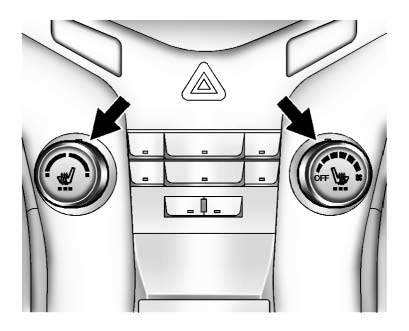
If available, the controls are on the center stack. The engine must be running to operate the heated seats.
Press  or
or
 to heat the driver or passenger seat
cushion and seatback.
to heat the driver or passenger seat
cushion and seatback.
Press the control once for the highest setting. With each press of the control, the heated seat will change to the next lower setting, and then the off setting. Three lights indicate the highest setting and one light the lowest.
The passenger seat may take longer to heat up.
Remote Start Heated Seats
When it is cold outside, the heated seats can be turned on automatically during a remote vehicle start. The heated seats will be canceled when the ignition is turned on. Press the control to use the heated seats after the vehicle is started.
The heated seat indicator lights on the control do not turn on during a remote start.
The temperature performance of an unoccupied seat may be reduced.
This is normal.
The heated seats will not turn on during a remote start unless the heated seat feature is enabled in the vehicle personalization menu.
 Reclining Seatbacks
WARNING
If either seatback is not locked, it could move forward in a sudden stop or
crash. That could cause injury to the person sitting there.
Always push and pull on the seatbacks to be sure the ...
 Rear Seats
Either side of the rear seatback can be folded.
To fold the rear seatbacks:
1. Place the front seatbacks in the upright position.
Notice: Folding a rear seat with the safety belts still fastened ma ...
Other materials:
Washer Fluid
What to Use
When windshield washer fluid is needed, be sure to read the manufacturer's instructions
before use. If operating the vehicle in an area where the temperature may fall below
freezing, use a fluid that has sufficient protection against freezing.
Adding Washer Fluid
Open the ca ...
Air Conditioning Compressor Replacement (1.6L LXT)
Preliminary Procedures
Recover the refrigerant. Refer to Refrigerant Rec overy and
Recharging.
Remove drive belt. Refer to Generator and Air Conditioning Compressor
and Power Steering Pump Belt Replacement.
Raise and support the vehicle. Refer to Lifting and Jacking the Vehic ...
Rear Bumper Fascia Outer Guide Replacement
Preliminary Procedure
Remove the rear bumper fascia. Refer to Rear Bumper Fascia Replacement.
Rear Bumper Fascia Outer Guide Rivet (Qty: 3)
Special Tools
BO-594-A Hand Rivet Tongs
For equivalent regional tools, refer to Special Tools.
Rear Bumper Fascia Outer Guide
...
