
Chevrolet Cruze Repair Manual: Installation Procedure
- Align the body side outer panel reinforcement.
- Clean and prepare the attaching surfaces for welding.
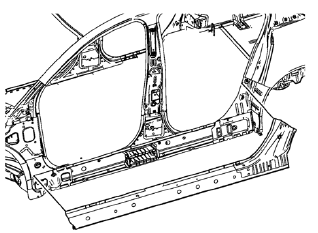
- Position the body side outer panel reinforcement on the vehicle.
- Verify the fit of the body side outer panel reinforcement.
- Clamp the body side outer panel reinforcement into position.
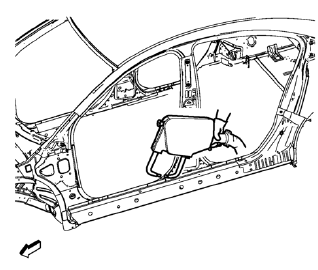
- Spot weld accordingly.
- Apply the sealers and anti-corrosion materials to the repair area, as necessary. Refer to Anti-Corrosion Treatment and Repair.
- Paint the repaired area. Refer to Basecoat/Clearcoat Paint Systems.
- Install all related panels and components.
- Connect the negative battery cable. Refer to Battery Negative Cable Disconnection and Connection.
- Enable the SIR system. Refer to SIR Disabling and Enabling.
 Removal Procedure
Warning: Refer to Approved Equipment for Collision Repair Warning in the
Preface section.
Warning: Refer to Collision Sectioning Warning in the Preface section.
Warning: Refer to Glass and She ...
 Body Side Inner Panel Sectioning (MAG-Welding)
Note: According to different corrosion warranties, only the
regional mandatory joining methods are allowed. ...
Other materials:
Ashtrays
For vehicles with a removable ashtray, the ashtray can be placed into the front
console cupholders.
To open the ashtray, lift the lid of the ashtray. After using, close the lid.
To empty the ashtray for cleaning, slightly turn the upper part of the ashtray
counterclockwise and remove it.
Noti ...
Rear Bumper Fascia Guide Replacement
Preliminary Procedure
Remove the rear bumper fascia. Refer to Rear Bumper Fascia Replacement.
Rear Bumper Fascia Guide Rivet (Qty: 4)
Special Tools
BO-594-A Hand Rivet Tongs
For equivalent regional tools, refer to Special Tools.
Rear Bumper Fascia Guide
Rear Bumper Fascia Inner ...
Removal Procedure
Warning: Refer to Approved Equipment for Collision Repair Warning in the
Preface section.
Warning: Refer to Collision Sectioning Warning in the Preface section.
Warning: Refer to Glass and Sheet Metal Handling Warning in the Preface section
Disable the SIR System. Refer to SIR ...
