
Chevrolet Cruze Repair Manual: Installation Procedure
- Clean and prepare the attaching surfaces for welding.
- Apply structural adhesive to the attaching flanges.
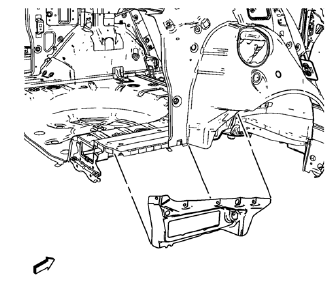
- Position the body side outer lower panel on the vehicle
- Verify the fit of the body side outer lower panel.
- Clamp the body side outer lower panel into position.
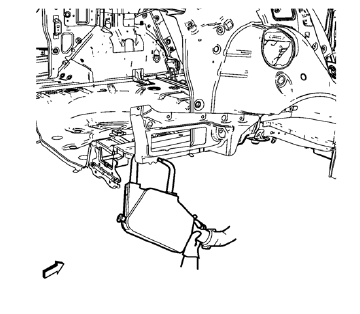
- Spot weld accordingly.
- Apply the sealers and anti-corrosion materials to the repair area, as necessary. Refer to Anti-Corrosion Treatment and Repair.
- Paint the repaired area. Refer to Basecoat/Clearcoat Paint Systems.
- Install all related panels and components.
- Connect the negative battery cable. Refer to Battery Negative Cable Disconnection and Connection.
- Enable the SIR system. Refer to SIR Disabling and Enabling.
 Removal Procedure
Warning: Refer to Approved Equipment for Collision Repair Warning in the
Preface section.
Warning: Refer to Glass and Sheet Metal Handling Warning in the Preface section.
Disable the SIR Syst ...
 Rear Compartment Floor Panel Sectioning (MAG-Welding)
Note: According to different corrosion warranties, only the
regional mandatory joining methods are allowed. ...
Other materials:
Removal Procedure
Warning: Refer to Glass and Sheet Metal Handling Warning in the
Preface section.
Disable the SIR System. Refer to SIR Disabling
and Enabling.
Disconnect the negative battery cable. Refer to Battery Negative Cable
Disconnection and Connection.
Remove the rear side door. Refer to ...
Clock
The infotainment system controls are used to access the time and date settings
through the menu system. For vehicles with a connective radio or navigation system,
see the infotainment manual.
Setting the Time and Date
To set the time and date for the radio with CD:
1. Press CLOCK.
2. Select ...
How Does an Airbag Restrain?
In moderate to severe frontal or near frontal collisions, even belted occupants
can contact the steering wheel or the instrument panel. In moderate to severe side
collisions, even belted occupants can contact the inside of the vehicle.
Airbags supplement the protection provided by safety belts ...
