
Chevrolet Cruze Repair Manual: Installation Procedure
- Clean and prepare the attaching surfaces for welding.
- Apply structural adhesive to the attaching surfaces.
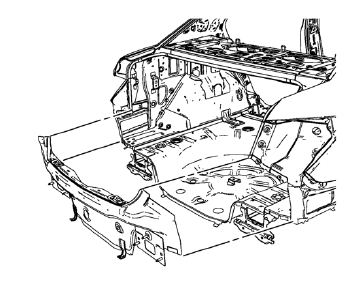
- Position the body rear end panel on the vehicle.
- Verify the fit of the body rear end panel.
- Clamp the body rear end panel into position.
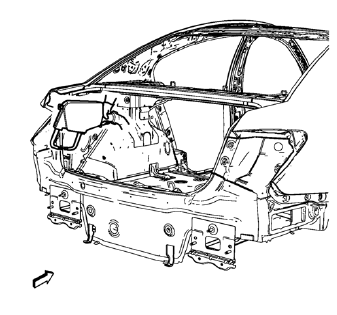
- Spot weld accordingly as noted from the original part.
- Apply the sealers and anti-corrosion materials to the repair area, as necessary. Refer to Anti-Corrosion Treatment and Repair.
- Paint the repaired area. Refer to Basecoat/Clearcoat Paint Systems.
- Install all related panels and components.
- Connect the negative battery cable. Refer to Battery Negative Cable Disconnection and Connection.
- Enable the SIR system. Refer to SIR Disabling and Enabling.
 Removal Procedure
Warning: Refer to Approved Equipment for Collision Repair Warning in the
Preface section.
Warning: Refer to Glass and Sheet Metal Handling Warning in the Preface section.
Disable the SIR Syst ...
 Rear Bumper Impact Bar Stud Plate Replacement (MAG-Welding)
Note: According to different corrosion warranties, only the
regional mandatory joining methods are allowed. ...
Other materials:
Installation Procedure
Align the rear compartment floor panel.
Drill 8 mm (5/16 in) for plug welding along the edges of the rear compartment
floor panel as noted from the original panel.
Clean and prepare the attaching surfaces for
welding.
Position the rear compartment floor panel on the vehicle.
V ...
Front Side Door Window Weatherstrip Replacement
Preliminary Procedure
Remove the outside rearview mirror. Refer to Outside Rearview
Mirror Replacement.
Remove the front side door window frame rear cover. Refer to Front Side
Door Window Frame Rear Cover Replacement.
Front Side Door Window Weatherstrip
Procedure
Pull the ...
Navigation Symbols
Following are the most common symbols that appear on a map screen.
The vehicle symbol indicates the current position and heading direction of the
vehicle on the map.
The destination symbol marks the final destination after a route has been planned.
The waypoint symbol marks one or more se ...
