
Chevrolet Cruze Repair Manual: Inflatable Restraint Side Impact Sensor Replacement
Warning: Refer to SIR Warning in the Preface section.
Warning: Refer to SIR Inflator Module Handling and Storage Warning in the Preface section.
Warning: Following the deployment of a side impact air bag, inspect the following parts for damage. Replace these parts if necessary:
- The seat cushion frame
- The seat recliner, if equipped
- The seat adjuster
- The seat back frame
Failure to do so may cause future personal injury.
Preliminary Procedure
- Disable the SIR system. Refer to SIR Disabling and Enabling
- Remove center pillar lower garnish molding. Refer to Center Pillar Lower Garnish Molding Replacement
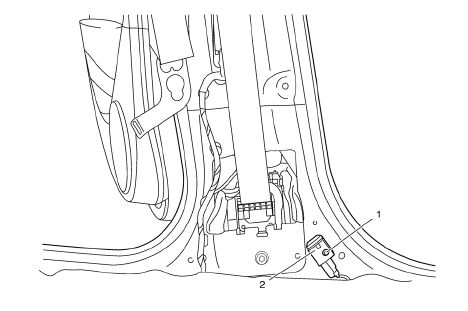
Inflatable Restraint Side Impact Sensor Screw
Caution: Refer to Fastener Caution in the Preface section.
Tighten 7.5 N·m (66 lb in)
Inflatable Restraint Side Impact Sensor Assembly
Procedure
- Disconnect electrical connector.
- Loosen the bolts and slide the sensor out of the keyhole slots.
Tip
The bolt is integral to the sensor assembly, DO NOT remove separately.
Inflatable Restraint Sensing and Diagnostic Module Replacement
Preliminary Procedure
- Disable the supplemental inflatable restraint (SIR) system. Refer to SIR Disabling and Enabling.
- Remove the instrument panel lower trim panel. Refer to Instrument Panel Lower Trim Panel Replacement - Left Side and Instrument Panel Lower Trim Panel Replacement - Right Side
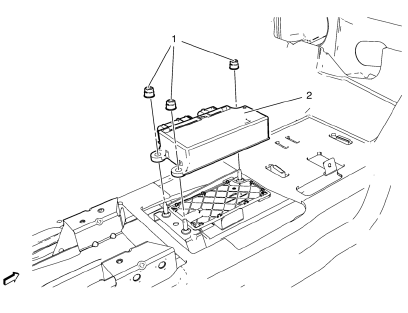
- Disconnect the electrical connector.
Inflatable Restraint Sensing and Diagnostic Module Nut (Qty: 3)
Caution: Refer to Fastener Caution in the Preface section.
Tighten 10 N·m(89 lb in)
Inflatable Restraint Sensing and Diagnostic Module Assembly
Tip
If installing a replacement module, program the module. Refer to Control Module References
 Front End Inflatable Restraint Discriminating Sensor Replacement
Warning: Refer to SIR Warning in the Preface section.
Warning: Following the deployment of a side impact air bag, inspect the
following parts for damage. Replace these parts if
necessary:
...
 Steering Wheel Inflatable Restraint Module Replacement
Removal Procedure
Warning: When carrying a live inflator module, make sure the bag opening
is pointed away from you. This minimizes the chance of injury
in the case of an accidental deployment. Ne ...
Other materials:
Center Console Storage
The center console storage has a storage area under the armrest. Pull up on the
latch on the front of the armrest to access.
Pull up on the latch and slide the center console armrest to adjust the position.
Return the armrest to the rear position to access the storage area.
There may be an a ...
Stitcher Internet Radio
Stitcher SmartRadio™ is an Internet radio service that streams news, sports,
and entertainment shows through the audio system. Create personalized, on-demand
stations or discover new shows through Stitcher's preset stations. To set up an
account, download the application from the Android M ...
Deployment Outside Vehicle for Seat Belt Pretensioners
Deploy the seat belt pretensioners outside of the vehicle when the vehicle
will be returned to service. Situations that require deployment
outside of the vehicle include the following:
Using the SIR diagnostics, you determine that the seat belt pretensioner
is malfunctioning.
The pretens ...
