
Chevrolet Cruze Repair Manual: Removal Procedure
Warning: Refer to Approved Equipment for Collision Repair Warning in the Preface section.
Warning: Refer to Glass and Sheet Metal Handling Warning in the Preface section.
- Disable the SIR System. Refer to SIR Disabling and Enabling.
- Disconnect the negative battery cable. Refer to Battery Negative Cable Disconnection and Connection.
- Remove all related panels and components.
- Visually inspect the damage. Repair as much of the damage as possible.
- Remove the sealers and anti-corrosion materials from the repair area, as necessary. Refer to Anti-Corrosion Treatment and Repair.
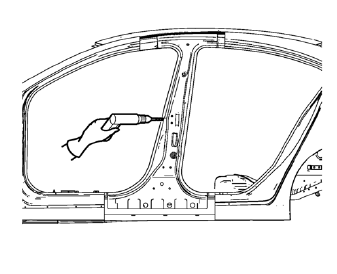
- Locate and mark all the necessary factory welds of the body lock pillar outer panel reinforcement.
- Drill all factory welds. Note the number and location of welds for installation of the service assembly.
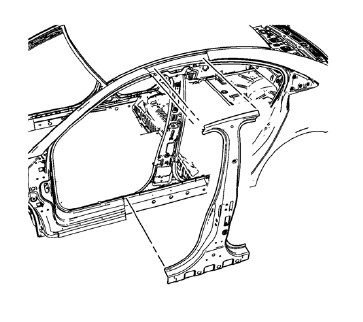
- Remove the damaged body lock pillar outer panel reinforcement.
 Body Lock Pillar Outer Panel Reinforcement Replacement (MIG-Brazing)
Note: According to different corrosion warranties, only the
regional mandatory joining methods are allowed. ...
 Installation Procedure
Prepare all mating surfaces as necessary.
Align the body lock pillar outer panel reinforcement.
Create 8 x 24 mm (5/16 x 15/16 in) slots for MIG-brazing upper (1) and
lower (2).
Cl ...
Other materials:
Driver or Passenger Seat Back Cushion Cover and Pad Replacement
Removal Procedure
Warning: Refer to SIR Warning in the Preface section.
Warning: Replace the passenger presence system as a complete assembly to prevent
possible injury to the occupant. The bladder, the
pressure sensor, the seat cushion, and the control module are assembled and
calibrated a ...
Vehicle Messages
Messages displayed on the DIC indicate the status of the vehicle or some action
that may be needed to correct a condition. Multiple messages may display one after
the other.
The messages that do not require immediate action can be acknowledged and cleared
by pressing SET/CLR. The messages tha ...
Installation Procedure
Drill 8 mm (5/16 in) for plug welding along the edges of the rear inner
wheelhouse as noted from the original panel.
Note: If the location of the original plug weld holes can not be
determined, space the plug weld holes every 40 mm (1½ in).
Clean and prepare the attaching & ...
