
Chevrolet Cruze Repair Manual: Removal Procedure
Warning: Refer to Approved Equipment for Collision Repair Warning in the Preface section.
Warning: Refer to Glass and Sheet Metal Handling Warning in the Preface section.
- Disable the SIR System. Refer to SIR Disabling and Enabling.
- Disconnect the negative battery cable. Refer to Battery Negative Cable Disconnection and Connection.
- Remove all related panels and components.
- Visually inspect the damage. Repair as much of the damage as possible.
- Remove the sealers and anti-corrosion materials from the repair area, as necessary. Refer to Anti-Corrosion Treatment and Repair.
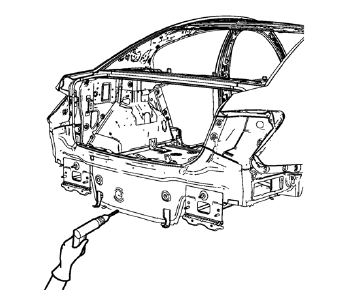
- Locate and mark all the necessary factory welds of the body rear end panel.
Note: Note the number and location of welds for installation of the service assembly.
- Drill all factory welds.
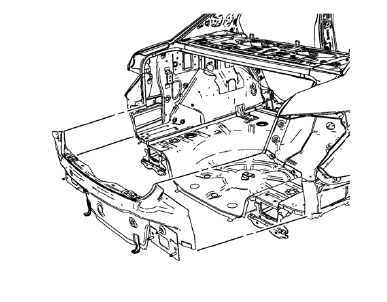
- Remove the body rear end panel.
 Body Rear End Panel Replacement (MIG-Brazing)
Note: According to different corrosion warranties, only the
regional mandatory joining methods are allowed. ...
 Installation Procedure
Clean and prepare the attaching surfaces for welding.
Apply structural adhesive to the attaching surfaces.
Position the body rear end panel on the vehicle.
Verify the fit of the body ...
Other materials:
Parking Brake
To apply the parking brake, pull up on the parking brake handle. It is not necessary
to push in on the release button while applying the parking brake. If the ignition
is in the ON/RUN position, the brake system warning light will come on.
To release the parking brake:
1. Hold the brake peda ...
Installation Procedure
Align the front side door outer panel.
Verify the fit of the front side door outer panel.
Clamp the front side door outer panel
into position.
Pre-flanging the flange with BO-6396 pliers and BO-6392 tool kit .
Continue to hammer in stages along the hem flanges.
...
Water Hose Test
Note: Use a water hose without the nozzle attached.
Have an assistant inside of the vehicle i 1. n order to locate the leak.
Begin testing at the base of the window or the windshield.
Slowly move the hose upward and across the top of the vehicle.
...
