
Chevrolet Cruze Repair Manual: Removal Procedure
Warning: Refer to Approved Equipment for Collision Repair Warning in the Preface section.
Warning: Refer to Glass and Sheet Metal Handling Warning in the Preface section.
- Disable the SIR System. Refer to SIR Disabling and Enabling.
- Disconnect the negative battery cable. Refer to Battery Negative Cable Disconnection and Connection.
- Remove all related panels and components.
- Visually inspect the damage. Repair as much of the damage as possible.
- Remove the sealers and anti-corrosion materials from the repair area, as necessary. Refer to Anti-Corrosion Treatment and Repair.
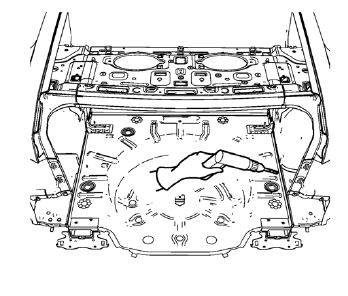
- Locate and mark all the necessary factory welds of the rear compartment floor panel.
- Note the number and location of weld studs for installation of the service assembly.
- Drill all factory welds.
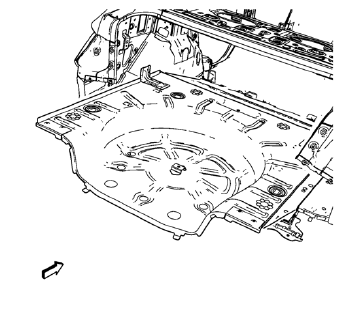
- Remove the damaged rear compartment floor panel.
 Rear Compartment Floor Panel Sectioning (MIG-Brazing)
Note: According to different corrosion warranties, only the
regional mandatory joining methods are allowed. ...
 Installation Procedure
Align the rear compartment floor panel.
Drill 4 mm (3/16 in) for rivets along the edges of the rear compartment
floor were you cant apply a resistance spot welder.
Clean and prepare ...
Other materials:
Front Fog Lamp Replacement
Preliminary Procedures
Raise and support the vehicle. Refer to Lifting
and Jacking the Vehicle.
Remove the front bumper fascia. Refer to Front Bumper Fascia
Replacement.
Disconnect fog lamp bulb socket electrical connector.
Front Fog Lamp Screws (Qty: 3)
Caution: Refer t ...
Frontal SIR System Description
The frontal supplemental inflatable restraint (SIR) system consists of the
following components:
AIR BAG indicator located in the instrument cluster
Inflatable restraint sensing and diagnostic module (SDM)
Inflatable restraint passenger presence detection system
Inflatable restraint Pass ...
Brakes
This vehicle has front disc brakes and could have rear drum brakes or rear disc
brakes.
Disc brake pads have built-in wear indicators that make a high-pitched warning
sound when the brake pads are worn and new pads are needed.
The sound can come and go or be heard all the time the vehicle is m ...
