
Chevrolet Cruze Repair Manual: Removal Procedure
Warning: Refer to Approved Equipment for Collision Repair Warning in the Preface section.
Warning: Refer to Glass and Sheet Metal Handling Warning in the Preface section.
- Disable the SIR System. Refer to SIR Disabling and Enabling.
- Disconnect the negative battery cable. Refer to Battery Negative Cable Disconnection and Connection.
- Remove all related panels and components.
- Visually inspect the damage. Repair as much of the damage as possible.
- Remove the sealers and anti-corrosion materials from the repair area, as necessary. Refer to Anti-Corrosion Treatment and Repair.
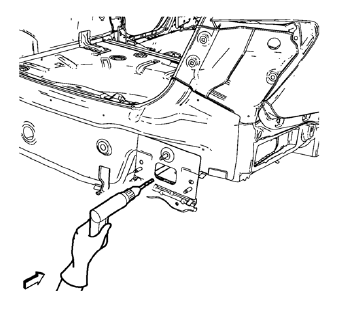
- Locate and mark all the necessary factory welds of the rear bumper impact bar stud plate.
Note: Note the number and location of welds for installation of the service assembly.
- Drill all factory welds.
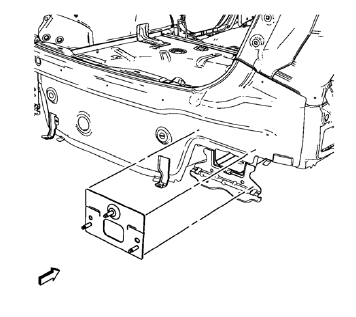
- Remove the rear bumper impact bar stud plate.
 Rear Bumper Impact Bar Stud Plate Replacement (MIG-Brazing)
Note: According to different corrosion warranties, only the
regional mandatory joining methods are allowed. ...
 Installation Procedure
Clean and prepare the attaching surfaces for brazing.
Apply structural adhesive to the attaching surfaces.
Position the rear bumper impact bar stud plate on the vehicle.
Verify ...
Other materials:
Instrument Panel Accessory Bezel Replacement
Preliminary Procedure
Remove transmission control cover. Refer to Automatic or Manual Transmission
Control Lever Trim Cover Replacement.
Instrument Panel Accessory Bezel Screw (Qty: 4)
Caution: Refer to Fastener Caution in the Preface section.
Tighten
2.5 N·m (23 lb in).
Instrume ...
Retained Accessory Power (RAP)
These vehicle accessories may be used for up to 10 minutes after the engine is
turned off:
• Audio System
• Power Windows
• Sunroof
The power windows and sunroof will continue to work for up to 10 minutes or until
any door is opened. The radio will work when the key is in ON/RUN or ACC/ ACCE ...
Tail Lamp Replacement
Preliminary Procedures
Open and support the rear compartment
lid.
Remove the body side trim panel replacement in order to expose the tail
lamp pocket nuts. Refer to Body Side Trim Panel
Replacement - Left Side.
Tail Lamp Bolt (Qty: 2)
Caution: Refer to Fastener Caut ...
