
Chevrolet Cruze Repair Manual: Removal Procedure
Warning: Refer to Approved Equipment for Collision Repair Warning in the Preface section.
Warning: Refer to Glass and Sheet Metal Handling Warning in the Preface section.
- Disable the SIR System. Refer to SIR Disabling and Enabling.
- Disconnect the negative battery cable. Refer to Battery Negative Cable Disconnection and Connection.
- Remove all related panels and components.
- Visually inspect the damage. Repair as much of the damage as possible.
- Remove the sealers and anti-corrosion materials from the repair area, as necessary. Refer to Anti-Corrosion Treatment and Repair.
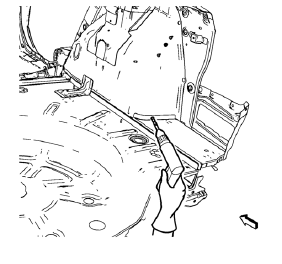
- Locate and mark all the necessary factory welds of the rear floor panel filler.
Note: Note the number and location of welds for installation of the service assembly.
- Drill all factory welds.
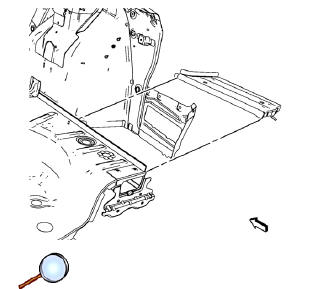
- Remove the rear floor panel filler.
 Rear Floor Panel Filler Replacement (MIG-Brazing)
Note: According to different corrosion warranties, only the
regional mandatory joining methods are allowed. ...
 Installation Procedure
Note: If the location of the original plug weld holes can not be
determined, space the braze holes every 40 mm (1½ in).
Create 5 x 18 mm (4/16 x 11/16 in) slots for MIG-brazing along ...
Other materials:
Vehicle Data Recording and Privacy
The vehicle has a number of computers that record information about the vehicle’s
performance and how it is driven. For example, the vehicle uses computer modules
to monitor and control engine and transmission performance, to monitor the conditions
for airbag deployment and deploy them in a cr ...
Rear Seat Back Cushion Cover and Pad Replacement - Left Side
Preliminary Procedure
Remove rear seat - left side. Refer to Rear Seat Replacement
Rear Seat Back Cushion Cover
Procedure
Remove the staples from the seat back cover.
Remove seat back cushion cover from Velcro.
Rear Seat Back Cushion Pad
Rear Seat Back Cushion Cover and Pad Re ...
Environmental Fallout (Acid Rain)
Caution: Refer to Clearcoat/Ultraviolet Screeners Caution in the
Preface section.
Note: Always refer to the manufacturer's packaged instructions for
the detailed procedures of materials used for compounding and/or
polishing.
Since the severity of the condition varies from area to area, proper ...
