
Chevrolet Cruze Repair Manual: Wheel Stud Replacement
Special Tools
CH-43631 Ball Joint Remover
For equivalent regional tools, refer to Special Tools.
Removal Procedure
- Raise and suitably support the vehicle. Refer to Lifting and Jacking the Vehicle.
- Remove the tire and wheel assembly. Refer to Tire and Wheel Removal and Installation.
- Remove and support the brake caliper and bracket as an assembly, and remove the brake rotor. Refer to Front Brake Rotor Replacement.
- Rotate the bearing hub to a position where the least amount of interference between the stud and the steering knuckle exists.
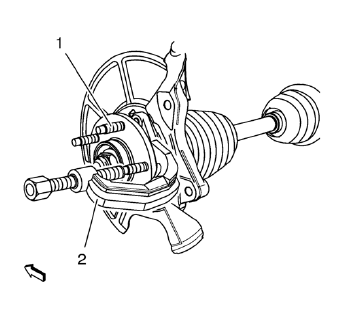
Caution: Support the brake caliper with heavy mechanic wire, or equivalent, whenever it is separated from its mount and the hydraulic flexible brake hose is still connected. Failure to support the caliper in this manner will cause the flexible brake hose to bear the weight of the caliper, which may cause damage to the brake hose and in turn may cause a brake fluid leak.
- Using the CH-43631 remover (2) release the wheel stud (1) from the bearing hub and discard the stud (1).
Installation Procedure
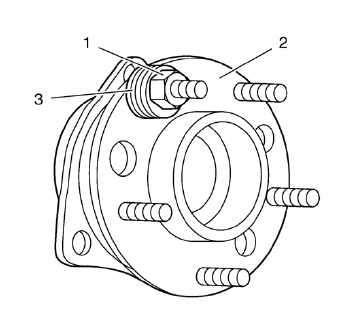
- Install a NEW stud into the bearing/hub assembly (2). Add enough washers (3) in order to draw the stud into the hub.
- Install and tighten a wheel nut (1) until the head of the wheel stud is fully seated against the back of the bearing/hub flange (2).
- Remove the wheel nut (1) and the washers (3).
- Install the brake rotor, and install the brake caliper and bracket as an assembly. Refer to Front Brake Rotor Replacement.
- Install the tire and wheel assembly. Refer to Tire and Wheel Removal and Installation.
- Lower the vehicle.
 Front Lower Control Arm Bushing Replacement
Preliminary Procedure
Raise and support the vehicle. Refer to Lifting and Jacking the
Vehicle.
Remove the tire and wheel. Refer to Tire and Wheel Removal and
Installation.
Remo ...
 Strut Assembly Replacement
Special Tools
CH 49375 Wrench
For equivalent regional tools, refer to Special Tools.
Removal Procedure
Raise and the vehicle. Refer to Lifting and Jacking the Vehicle.
Remove the tire and whe ...
Other materials:
Removal Procedure
Warning: Refer to Glass and Sheet Metal Handling Warning in the
Preface section.
Disable the SIR System. Refer to SIR
Disabling and Enabling.
Disconnect the negative battery cable. Refer to Battery Negative Cable
Disconnection and Connection.
Remove the rear side door. Refer t ...
Entry Lighting
The headlamps, parking lamps, taillamps, back-up lamps, and most of the interior
lamps turn on briefly when is pressed
on the Remote Keyless Entry (RKE) transmitter.
After about 30 seconds the exterior lamps turn off, and then the dome and remaining
interior lights will dim to off. Entry lig ...
AM-FM Radio
Control Buttons
The buttons used to control the radio are: BAND: Press to turn the radio
on and choose between AM, FM, and SiriusXM®, if equipped.
MENU/SEL: Turn to navigate the available menus and to search for stations.
INFO: Press to display additional information that may be available for
...
